V1 Users Extended by Roles returns 404 when making requests with certain base_role_rids





Hello,
When calling /v1/users/extended?base_role_ids=14,15,17,562 we are getting a 404 even though calling /v1/users/extended?base_role_ids=14,15 works.
Is this to be expected?
Comments
-
@Gerald Truong - I tested that combination of base role IDs in the Developer's Portal and in one of my programs (VB.net using SKYLib.Net). It worked as expected for me.
0 -
Good morning @Brian Gray, then I am stumped
 not sure why we are getting a 404. Any chance you could send me your version of the request URL? Maybe we malformed ours…0
 -
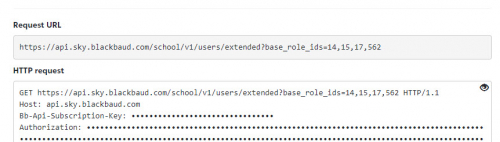
@Gerald Truong - The complete URL is
Have you tried it in the Developer's Portal? It shows you the URL for the call and the returned data (or error message).
 0
0 -
TY @Brian Gray! We are having issue testing within the developer portal. We get one of the following error:
- “You don’t have access to any SKY API enabled Blackbaud products.”
- { "statusCode": 401, "message": "The required Authorization header was missing or invalid, or the token has expired", "status": 401, "title": "The required Authorization header was missing or invalid, or the token has expired" }
We have an OAuth client_id and 2 OAuth secrets but not sure how do they get applied to the authorization fields within the request form. Under headers we see Bb-Api-Subscription-Key and under Authorization we get 2 fields: Blackbaud OAuth 2.0 Service and Subscription key. How does one get a subscription key for the developer portal?
0 -
@Gerald Truong - on the Developer's console page, near the top of the page there is a Try it button. (If there is a message next to it that says that you must sign in, do that - using an account that is authorized to use the API.)
When you are signed in with a valid account, you don't need to set the fields labeled BB-Api-Subscription-Key, Authorization, or Subscription key. Don't change them.
- Click the Try it button
- Enter a base role ID in the appropriate field.
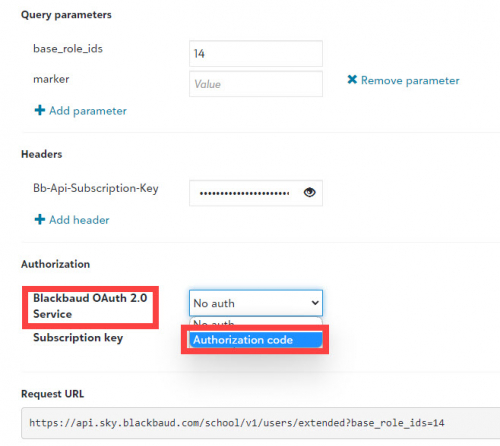
- In section labeled Blackbaud OAuth 2.0 Service, select Authorization code.
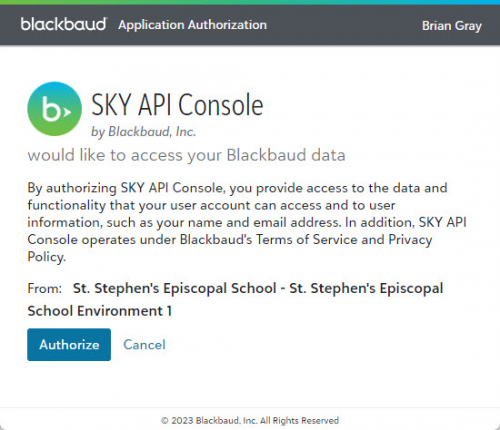
- A pop-up window will appear. Click Authorize. The pop-up will close. (If the pop-up does not appear, check your pop-up blocking settings.)
- Scroll down and click the Send button.
The pop-up authorization widow:
 0
0





Categories
- All Categories
- New K-12 Community Home (TEST)
- New Higher Education Home Page (Test)
- New Impact Edge Community TEST
- New YourCause Community TEST
- New SKY Community TEST
- New Grantmaking TEST Community
- New Altru Test Community
- New bbcon Community - TEST
- 12 Blackbaud Agents for Good™
- New Raiser's Edge NXT Community
- 8 Blackbaud Community Help
- 222 bbcon®
- 1.4K Blackbaud Altru®
- 411 Blackbaud Award Management™ and Blackbaud Stewardship Management™
- 1.2K Blackbaud CRM™ and Blackbaud Internet Solutions™
- 16 donorCentrics®
- 361 Blackbaud eTapestry®
- 2.7K Blackbaud Financial Edge NXT®
- 688 Blackbaud Grantmaking™
- 604 Blackbaud Education Management Solutions for Higher Education
- 3.3K Blackbaud Education Management Solutions for K-12 Schools
- 954 Blackbaud Luminate Online® and Blackbaud TeamRaiser®
- 85 JustGiving® from Blackbaud®
- 7.1K Blackbaud Raiser's Edge NXT®
- 4K SKY Developer
- 258 ResearchPoint™
- 123 Blackbaud Tuition Management™
- 165 Organizational Best Practices
- 249 Member Lounge (Just for Fun)
- 40 Blackbaud Community Challenges
- 37 PowerUp Challenges
- 3 (Closed) PowerUp Challenge: Grid View Batch
- 3 (Closed) PowerUp Challenge: Chat for Blackbaud AI
- 3 (Closed) PowerUp Challenge: Data Health
- 3 (Closed) Raiser's Edge NXT PowerUp Challenge: Product Update Briefing
- 3 (Closed) Raiser's Edge NXT PowerUp Challenge: Standard Reports+
- 3 (Closed) Raiser's Edge NXT PowerUp Challenge: Email Marketing
- 3 (Closed) Raiser's Edge NXT PowerUp Challenge: Gift Management
- 4 (Closed) Raiser's Edge NXT PowerUp Challenge: Event Management
- 3 (Closed) Raiser's Edge NXT PowerUp Challenge: Home Page
- 4 (Closed) Raiser's Edge NXT PowerUp Challenge: Standard Reports
- 4 (Closed) Raiser's Edge NXT PowerUp Challenge: Query
- 829 Community News
- 3.1K Jobs Board
- 57 Blackbaud SKY® Reporting Announcements
- 47 Blackbaud CRM Higher Ed Product Advisory Group (HE PAG)
- 19 Blackbaud CRM Product Advisory Group (BBCRM PAG)