Post Parameters / Posting Functionality Missing in Database View?





I was processing an AP payout today and when I went to validate in Database View, I noticed that all of my post parameters were missing. I checked and noticed that posting functionality wasn’t just missing from the AP module, but from all modules in Database View. Has anyone else experienced this issue? There is currently no option in the Administration tab to validate or post in Database View.
We currently have a workaround to post the AP payout from NXT, however we’ll be stuck when it comes time to post any activity from the Fixed Assets module. NXT currently doesn’t have any option to post transactions in the Fixed Assets module, and historically, we’ve only ever been able to do so in Database View.
Comments
-
@Christopher Hafer
Hey Christopher, We are experiencing the same issues. Can you tell me what the work around is for AP payout in NXT?0 -
@Delana Harris @Christopher Hafer perhaps you're unaware that BB are sunsetting the database view of Financial Edge? See the below knowledgebase articles.
I got an email about this change on 8/3/2023. It is slated to take effect as of today. The text of my email is below:
____________________________________________________________________________
We have an important update regarding the journey to a total web solution in Blackbaud Financial Edge NXT®. As a reminder from the last several Product Update Briefings, the following features are fully functional and available to you in webview:- Visual Chart Organizer (VCO)
- Post in General Ledger, Accounts Payable, Cash Receipts, and Fixed Assets
- General Ledger Configuration and Admin tasks:
- Interfunds
- Fields & Tables
- Attributes (Custom Fields)
- Transaction Codes and Account Codes
- Funds: configuration, entering/locking beginning balances
To facilitate better adoption by your end users and to ensure the highest quality in training and support, we will now move forward with the next phase in our process, eliminating the dual or "database view" of these features.
One of the features listed above, Post, has been identified as a frequently accessed task in database view and as previously communicated, we are providing advanced notice of this change and details on completing the equivalent task in webview.
Note: The Processing pages that contain Post, and other tasks that you can still complete within each subledger, for General Ledger, Accounts Payable, Cash Receipts, and Fixed Assets will also be made inaccessible.
This change will take effect on Thursday, August 17, 2023. To ensure a seamless transition, please see this Knowledgebase article for steps on posting in webview.
Questions about the transition to Financial Edge NXT total web solution? Check out this Knowledgebase article and look forward to more detailed information with future release updates!
Thank you,
Blackbaud
0 -
@Kylea Johnson
Thanks for the info. I was unaware. We never got the email you did.It's a shame that they're sunsetting our fallback options to be able to operate in the accounting system. What I mean by that is, Database view has been a form of redundancy and a fallback for us over the last few years when NXT either hasn't worked due to system bugs, or wasn't setup to work or perform certain functions to begin with. I have a list of items that I still do in Database view because they were previously working in NXT but funcionaliy was lost within NXT when there was some “improvement” made that changed our settings without our knowlege. For example, NXT wants to print checks on two pages… It's not every time either which is what makes it frustrating, but the point is that NXT is unreliable.
Database view historically has always been the most reliable way for us to work using Blackbaud's system. Things like this are precicely why we changed our renewal contract from a three-year to a one-year contract so we're not locked into this mess any longer than we have to be.
Sorry for venting this to you, but I know Blackbaud reads this, so most of this info is really for them to see.
5 -
@Delana Harris
Hi Delana,Our workaround is to go to the ribbon at the top, click General Ledger, then Post Subledgers. Then at the top left, click Post. Click the box for the Payables subledger and select your post parameter. Then you'll click Validate or Post depending on what you're doing. If you don't have any previously saved parameters, you won't click Post, you'll click Add when you get to the Post Subledgers page.
0 -
@Christopher Hafer
Thank you for the feedback. On the post sub-ledgers page, you should be able to see your Fixed assets post parameters. If there aren't any, you should be able to add new post parameters for Fixed assets. Do you not have them? If not, I'd advise getting in touch with our support staff so we can look into it and find a solution for you.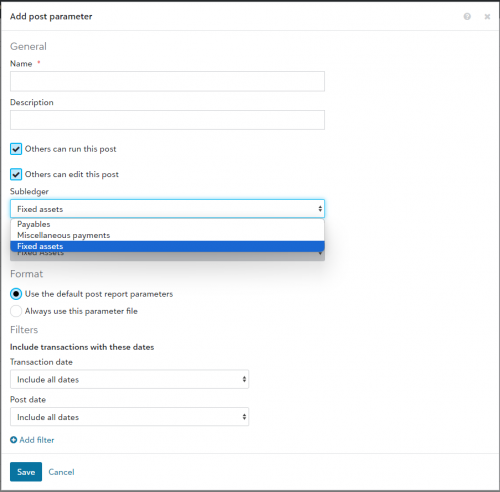 0
0 -
@Mohit Kumar
My question for you sir is, why is Blackbaud sunsetting the Datebase View when it has always been the most reliable option for users? When we switched from Financial Edge 7 to FE NXT, we were promised that Database View would ALWAYS be there for us to fall back on when there were issues. Our initial 3-year contract hasn't even ended yet and Blackbaud has reneged on that promise. What's the big idea?2






Categories
- All Categories
- New K-12 Community Home (TEST)
- New Higher Education Home Page (Test)
- New Impact Edge Community TEST
- New YourCause Community TEST
- New SKY Community TEST
- New Grantmaking TEST Community
- New Altru Test Community
- New bbcon Community - TEST
- 12 Blackbaud Agents for Good™
- New Raiser's Edge NXT Community
- 8 Blackbaud Community Help
- 222 bbcon®
- 1.4K Blackbaud Altru®
- 410 Blackbaud Award Management™ and Blackbaud Stewardship Management™
- 1.2K Blackbaud CRM™ and Blackbaud Internet Solutions™
- 16 donorCentrics®
- 361 Blackbaud eTapestry®
- 2.7K Blackbaud Financial Edge NXT®
- 687 Blackbaud Grantmaking™
- 604 Blackbaud Education Management Solutions for Higher Education
- 3.3K Blackbaud Education Management Solutions for K-12 Schools
- 954 Blackbaud Luminate Online® and Blackbaud TeamRaiser®
- 85 JustGiving® from Blackbaud®
- 7K Blackbaud Raiser's Edge NXT®
- 4K SKY Developer
- 258 ResearchPoint™
- 123 Blackbaud Tuition Management™
- 165 Organizational Best Practices
- 248 Member Lounge (Just for Fun)
- 40 Blackbaud Community Challenges
- 37 PowerUp Challenges
- 3 (Closed) PowerUp Challenge: Grid View Batch
- 3 (Closed) PowerUp Challenge: Chat for Blackbaud AI
- 3 (Closed) PowerUp Challenge: Data Health
- 3 (Closed) Raiser's Edge NXT PowerUp Challenge: Product Update Briefing
- 3 (Closed) Raiser's Edge NXT PowerUp Challenge: Standard Reports+
- 3 (Closed) Raiser's Edge NXT PowerUp Challenge: Email Marketing
- 3 (Closed) Raiser's Edge NXT PowerUp Challenge: Gift Management
- 4 (Closed) Raiser's Edge NXT PowerUp Challenge: Event Management
- 3 (Closed) Raiser's Edge NXT PowerUp Challenge: Home Page
- 4 (Closed) Raiser's Edge NXT PowerUp Challenge: Standard Reports
- 4 (Closed) Raiser's Edge NXT PowerUp Challenge: Query
- 829 Community News
- 3.1K Jobs Board
- 57 Blackbaud SKY® Reporting Announcements
- 47 Blackbaud CRM Higher Ed Product Advisory Group (HE PAG)
- 19 Blackbaud CRM Product Advisory Group (BBCRM PAG)