Expression. Error: Access to the resource is forbidden/Power BI Connector Failing?





I solved one error only for another to take it's place.
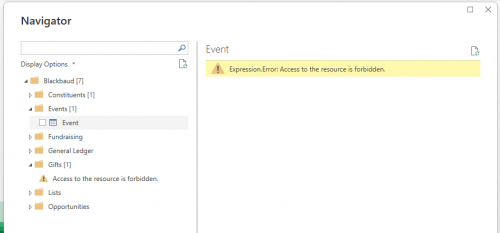
I finally got through the ‘Get Data’ to the Data Navigator only to receive the following error for every category:
I'm totally baffled, but I think I found the source of the issue. When I attempted to connect my Power BI Connector, following the instructions in the Github and YT video, I get the following error:
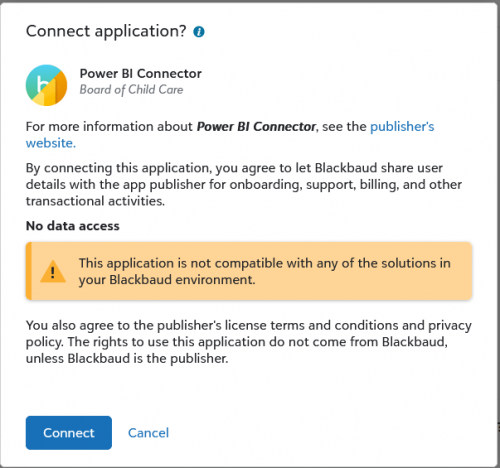
I'm not sure why it isn't compatible? We have NXT, and we're actively using it so like I know it's working.
Comments
-
@Cole Welsh It appears your application is still set to “No data access”. Please refer to this link for more information on setting the scopes.
You can then connect your application to your environment from “Manage page” in Marketplace. Here's the post on how someone who had a similar issue resolved it.
1 -
@Val Kuppuswamy Thank you so much for the links and the reference to the other post with a similar issue, that was absolutely my issue!
For developers in the future that find this thread as part of the Power BI Custom Connector:
When you upload the application to your account in developer.blackbaud.com/app, beneath the “redirect URL” you also need to select the scope of the application:
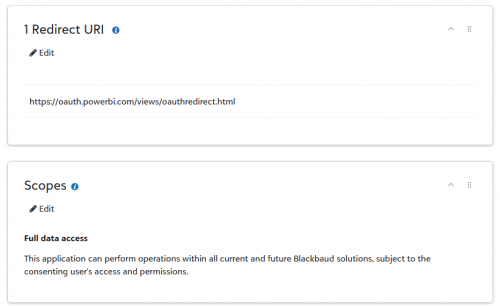
If this scope is not selected, it will default to “No data access”, resulting in the above error.
0 -
@Val Kuppuswamy hello Val! I am having this same issue. I tried the steps you mentioned.
I changed the scope to full access and then approved the changes. But when I launch Power BI I get the error Expression.Error: Access to the resource is forbidden.
What else do you think it could be? Thank you for any help on this.0




Categories
- All Categories
- New YourCause Community TEST
- New SKY Community TEST
- New Grantmaking TEST Community
- New Altru Test Community
- New bbcon Community - TEST
- 12 Blackbaud Agents for Good™
- New Raiser's Edge NXT Community
- 7 Blackbaud Community Help
- 218 bbcon®
- 1.4K Blackbaud Altru®
- 409 Blackbaud Award Management™ and Blackbaud Stewardship Management™
- 1.2K Blackbaud CRM™ and Blackbaud Internet Solutions™
- 16 donorCentrics®
- 361 Blackbaud eTapestry®
- 2.7K Blackbaud Financial Edge NXT®
- 680 Blackbaud Grantmaking™
- 598 Blackbaud Education Management Solutions for Higher Education
- 3.3K Blackbaud Education Management Solutions for K-12 Schools
- 952 Blackbaud Luminate Online® and Blackbaud TeamRaiser®
- 85 JustGiving® from Blackbaud®
- 7K Blackbaud Raiser's Edge NXT®
- 3.9K SKY Developer
- 257 ResearchPoint™
- 123 Blackbaud Tuition Management™
- 165 Organizational Best Practices
- 247 Member Lounge (Just for Fun)
- 40 Blackbaud Community Challenges
- 37 PowerUp Challenges
- 3 (Closed) PowerUp Challenge: Grid View Batch
- 3 (Closed) PowerUp Challenge: Chat for Blackbaud AI
- 3 (Closed) PowerUp Challenge: Data Health
- 3 (Closed) Raiser's Edge NXT PowerUp Challenge: Product Update Briefing
- 3 (Closed) Raiser's Edge NXT PowerUp Challenge: Standard Reports+
- 3 (Closed) Raiser's Edge NXT PowerUp Challenge: Email Marketing
- 3 (Closed) Raiser's Edge NXT PowerUp Challenge: Gift Management
- 4 (Closed) Raiser's Edge NXT PowerUp Challenge: Event Management
- 3 (Closed) Raiser's Edge NXT PowerUp Challenge: Home Page
- 4 (Closed) Raiser's Edge NXT PowerUp Challenge: Standard Reports
- 4 (Closed) Raiser's Edge NXT PowerUp Challenge: Query
- 822 Community News
- 3.1K Jobs Board
- 57 Blackbaud SKY® Reporting Announcements
- 47 Blackbaud CRM Higher Ed Product Advisory Group (HE PAG)
- 19 Blackbaud CRM Product Advisory Group (BBCRM PAG)