Conditional Formatting Between Two Tables, Two Different Parameters





Ok forgive my being a novice and maybe biting off more than I can chew.
I was asked to create tables showing comparison giving from year to year.
The coding is being done based off appeals as we institute them numerically.
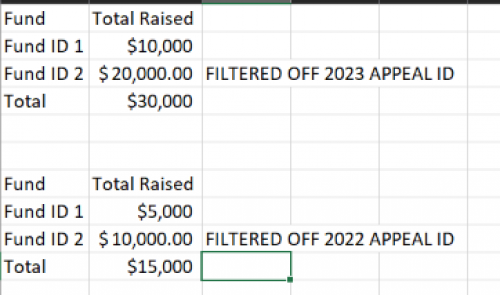
So in power bi i have one table showing amount raised on specific filters for appeals starting in 2023 (as well as other information)
In another table I have the same parameters, but adjusted the filter to show only 2022 appeal.
What I would like to accomplish is instituting a conditional format where:
If 2023 Appeal Total is Greater than 2022 Appeal Total, then “green”
My table is set up as follows:
Columns:
Fund ID Total Raised
Rows:
Each fund
Filter: Appeal ID starts with YYYY
I moved my data into excel for data protection to convey how it's set up.
Thank you in advance.
Comments
-
@Nicole Barry
I don't believe you can conditional format based on multiple columns/measures of information. So you will have to first come up with 1 “piece” of info. If calculated column or measure will depend on your model.You will want to setup a column/measure that you can “conditional rule on”. For example, maybe 2023-2022 and call it YOY Delta. Then conditional rule on this column/measure for IF YOY Delta is > 0, positive means 2023 is greater than 2022, then green. additional format 0 as black and negative (< 0) as red if you want.
0 -
@Alex Wong; thank you I had imagined I couldn't do it the way I envisioned. I'll try to figure out the steps you conveyed. They ideally want a Favorable/Unfavorable column so I can try to use that as my measure/ conditional formatting. I just have to figure out how to create it, using your reference above.
0




Categories
- All Categories
- New YourCause Community TEST
- New SKY Community TEST
- New Grantmaking TEST Community
- New Altru Test Community
- New bbcon Community - TEST
- 12 Blackbaud Agents for Good™
- New Raiser's Edge NXT Community
- 7 Blackbaud Community Help
- 218 bbcon®
- 1.4K Blackbaud Altru®
- 409 Blackbaud Award Management™ and Blackbaud Stewardship Management™
- 1.2K Blackbaud CRM™ and Blackbaud Internet Solutions™
- 16 donorCentrics®
- 361 Blackbaud eTapestry®
- 2.7K Blackbaud Financial Edge NXT®
- 680 Blackbaud Grantmaking™
- 598 Blackbaud Education Management Solutions for Higher Education
- 3.3K Blackbaud Education Management Solutions for K-12 Schools
- 952 Blackbaud Luminate Online® and Blackbaud TeamRaiser®
- 85 JustGiving® from Blackbaud®
- 7K Blackbaud Raiser's Edge NXT®
- 3.9K SKY Developer
- 257 ResearchPoint™
- 123 Blackbaud Tuition Management™
- 165 Organizational Best Practices
- 247 Member Lounge (Just for Fun)
- 40 Blackbaud Community Challenges
- 37 PowerUp Challenges
- 3 (Closed) PowerUp Challenge: Grid View Batch
- 3 (Closed) PowerUp Challenge: Chat for Blackbaud AI
- 3 (Closed) PowerUp Challenge: Data Health
- 3 (Closed) Raiser's Edge NXT PowerUp Challenge: Product Update Briefing
- 3 (Closed) Raiser's Edge NXT PowerUp Challenge: Standard Reports+
- 3 (Closed) Raiser's Edge NXT PowerUp Challenge: Email Marketing
- 3 (Closed) Raiser's Edge NXT PowerUp Challenge: Gift Management
- 4 (Closed) Raiser's Edge NXT PowerUp Challenge: Event Management
- 3 (Closed) Raiser's Edge NXT PowerUp Challenge: Home Page
- 4 (Closed) Raiser's Edge NXT PowerUp Challenge: Standard Reports
- 4 (Closed) Raiser's Edge NXT PowerUp Challenge: Query
- 822 Community News
- 3.1K Jobs Board
- 57 Blackbaud SKY® Reporting Announcements
- 47 Blackbaud CRM Higher Ed Product Advisory Group (HE PAG)
- 19 Blackbaud CRM Product Advisory Group (BBCRM PAG)