Switch environment

My application is connected to two environments. How do I switch environment when making API calls. We first connected a test environment and later production environment. It looks like list of available environments should show in dropdown on sign in screen. It is just showing the test environment in my case. Did I miss any step while connecting the second environment?


Comments

  • Ashley Moose
    Ashley Moose Blackbaud Employee
    Eighth Anniversary Kudos 5 First Reply Name Dropper

    @Sangeeta Sharma If you are not seeing the other environment in the dropdown in the sign in screen, you likely missed the step to add the application to the environment through the marketplace. To do so:

    1. Sign into the environment
    2. In the upper left navigation, click the three bars icon and go to Marketplace
    3. Go to Manage > Connect App
    4. Add your application ID and click Connect. (The application ID can be found on the actual application from the Developer Portal).
  • @Ashley Moose
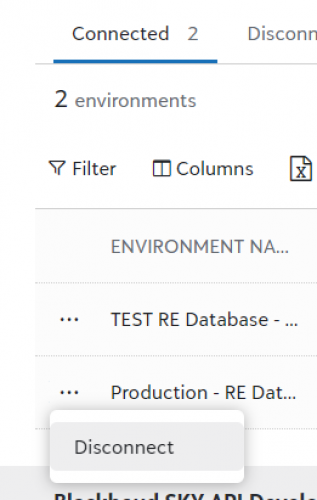
    Hi Ashley, thank you for replying. Second environment was connected by the Environment admin. I can see both the environments in application's list of environment. Here is screenshot.

    a69b743731e9f0d07fb788246d04fad0-huge-im

    Only difference is that second database says No in Authorized column.

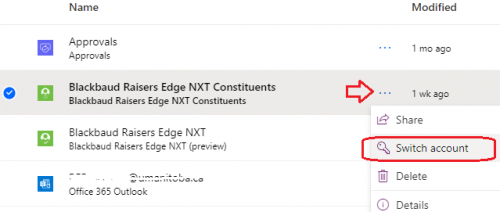
  • @Sangeeta Sharma If I'm understanding your question correctly, you're trying to switch the RENXT environment that is being used in a flow/app. The thing with the connectors is that they are used in the entire solution (e.g. Power Automate Environment). So going to the Connections and switching the account to use a different RENXT environment will impact all flows using that connector.

    f6cd9c7345502bbcd7a7d15e9930dc13-huge-im
    screen shot of connections in Power Automate

    So if you want to do a mix - have some flows running on ‘live data’ in RENXT and the others using ‘test data’ in RENXT - you will have to be particular about which connectors you add/use. (You'll recall that you select the RENXT Environment when you're authorize the connector.)

    While I could add a second connection to the same API (i.e. have two NXT Constituent connections), I couldn't figure out an easy way to rename the connector itself so that I would know which one was connected to live and which was connected to test. My solution was to set up two Power Automate environments so that I can have one environment were I use a connector to our "test environment' in RENXT and the other to our live data. When I've done testing a flow I recreate that flow in my Power Automate ‘Production’ environment. Yes, it's duplication of work, but it helps keep clarity for the connections so we don't accidently change things in the live RENXT database

    958a90661390e3fb0d38318600e5ca56-huge-im
    screen shot of Power Automate Environment
  • @Ashley Moose
    Thanks for the reply. We figured that, I needed to be added as user for production database by admin. My access to the database was missing. It started showing up on login screen after my account was given access.

Categories