RE posting to FE JE batch disappeared





Hi,
Does anyone know has experience or know the cause of the “disappearing” JE batch?
Basically our accounting team was posting new gifts from RE into FE, everything appear to have worked without issue according to him. He went into FE and saw the JE batch for the posted gift initally.
Then he went away and did something else, but when he went back to FE > JE, the batch is gone.
I have a 4-hour refreshing data warehouse, so between my 1PM refresh and 5PM refresh, I see that the batch he is talking about, batch system record id=23403 with the JE batch number (the one visible in the batch list screen)=17265. By the time 5PM refresh happen, I was notified by my automation that 36,900 transaction distribution was deleted from FE, which is the exact number of transactions (divide by half for debit and credit lines, equals to 18,450 splits of gifts that were newly posted. When double checking, all the gifts were marked as POSTED in RE already.
@Barton Dyson I remember you told me you were involve with FE from the beginning, can you share some light on what situation that can cause RE post to FE having the FE batch “deleted” in the background by FE “service”?
Comments
-
@Alex Wong I can't think of a reason for that situation to happen, and I haven't heard of that before. Even if the user deleted the batch, you would still see the batch in gl/journal entry marked as deleted with no entries in it. If you try to look up that batch system record id within the url of the je batch page, and don't get a result, then something must have happened. I would check with support, but your best course of action is to see about changing back all entries posted from RE to Not Posted status and post again.
0 -
@Barton Dyson
I did use the system record id of the batch and put into the URL directly and would get a “Nothing to see here”. So the batch is definitely “gone” from FE completely.What is the best way to identify the specific gifts that is affected in order to do unpost utility
0 -
@Alex Wong If an output file or query was created as part of the post, that could be useful. If a query was created, global change can be used to update those records to not posted. If that doesn't exist, then will need to check gift dates or date entered to try to determine which gifts posted.
0 -
So after a long back and forth with Blackbaud. I think they finally found the bug.
They are currently giving the workaround until the bug is fixed as:
RE users should EITHER make sure to close the previewed post report OR print the post report instead of previewing it (as shown in screenshot).
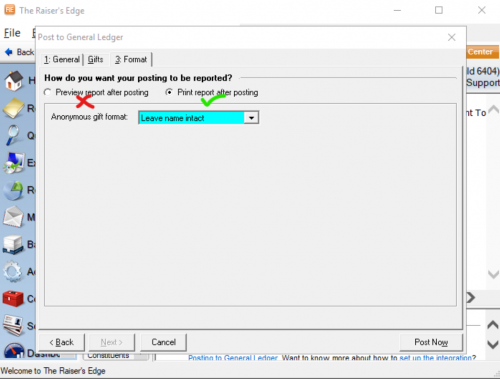
So I guess the issue is, if you were posting (no prepost) and selected to preview report after posting and is in the “preview” screen, and then “walked away" and RE “disconnect” or “close down". RE somehow mistakenly thinks posting did not finish and delete the FE GL for the post, meanwhile RE gifts remained as posted.
Everyone should be aware and beware…..
0





Categories
- All Categories
- New YourCause Community TEST
- New SKY Community TEST
- New Grantmaking TEST Community
- New Altru Test Community
- New bbcon Community - TEST
- 12 Blackbaud Agents for Good™
- New Raiser's Edge NXT Community
- 7 Blackbaud Community Help
- 218 bbcon®
- 1.4K Blackbaud Altru®
- 409 Blackbaud Award Management™ and Blackbaud Stewardship Management™
- 1.2K Blackbaud CRM™ and Blackbaud Internet Solutions™
- 16 donorCentrics®
- 361 Blackbaud eTapestry®
- 2.7K Blackbaud Financial Edge NXT®
- 680 Blackbaud Grantmaking™
- 598 Blackbaud Education Management Solutions for Higher Education
- 3.3K Blackbaud Education Management Solutions for K-12 Schools
- 952 Blackbaud Luminate Online® and Blackbaud TeamRaiser®
- 85 JustGiving® from Blackbaud®
- 7K Blackbaud Raiser's Edge NXT®
- 3.9K SKY Developer
- 257 ResearchPoint™
- 123 Blackbaud Tuition Management™
- 165 Organizational Best Practices
- 247 Member Lounge (Just for Fun)
- 40 Blackbaud Community Challenges
- 37 PowerUp Challenges
- 3 (Closed) PowerUp Challenge: Grid View Batch
- 3 (Closed) PowerUp Challenge: Chat for Blackbaud AI
- 3 (Closed) PowerUp Challenge: Data Health
- 3 (Closed) Raiser's Edge NXT PowerUp Challenge: Product Update Briefing
- 3 (Closed) Raiser's Edge NXT PowerUp Challenge: Standard Reports+
- 3 (Closed) Raiser's Edge NXT PowerUp Challenge: Email Marketing
- 3 (Closed) Raiser's Edge NXT PowerUp Challenge: Gift Management
- 4 (Closed) Raiser's Edge NXT PowerUp Challenge: Event Management
- 3 (Closed) Raiser's Edge NXT PowerUp Challenge: Home Page
- 4 (Closed) Raiser's Edge NXT PowerUp Challenge: Standard Reports
- 4 (Closed) Raiser's Edge NXT PowerUp Challenge: Query
- 822 Community News
- 3.1K Jobs Board
- 57 Blackbaud SKY® Reporting Announcements
- 47 Blackbaud CRM Higher Ed Product Advisory Group (HE PAG)
- 19 Blackbaud CRM Product Advisory Group (BBCRM PAG)