Power BI Connector

Powr BI Connector is connected to my environment but Blackbaud is not showing up in Powr BI Desktop. I followed the instructions step by step. Redid the steps several times, but I am still not able to pull Blackbaud from Get Data in PBI. I read all the posts pertaining to the Power BI Connector, but I could not find anything similar to what my issue is. Any help will be appreciated. Thank you!


Comments

  • Alex Wong
    Alex Wong Community All-Star
    Ninth Anniversary Kudos 5 Facilitator 3 bbcon 2025 Attendee Badge

    @Souad Bouali
    If you haven't, check out this post and my replies that has the steps and pitfalls

  • Alex Wong
    Alex Wong Community All-Star
    Ninth Anniversary Kudos 5 Facilitator 3 bbcon 2025 Attendee Badge
  • @Alex Wong thank you Alex. I looked at all the posts nothing seems to help. PBI connector is connected by for some reason, not authorized. I will try to look again and I will let you know.

  • Alex Wong
    Alex Wong Community All-Star
    Ninth Anniversary Kudos 5 Facilitator 3 bbcon 2025 Attendee Badge

    @Souad Bouali
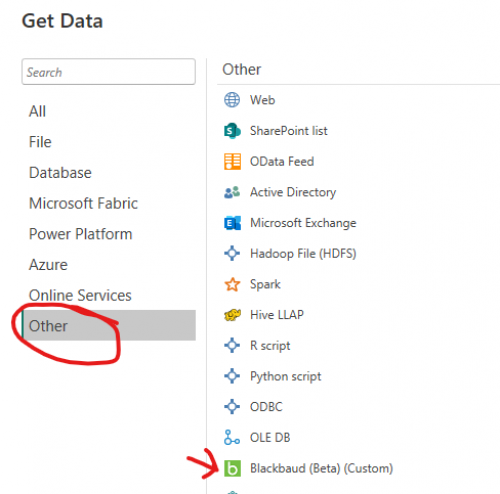
    if Blackbaud is not showing up in your Power BI Desktop > Get Data > Other:

    8b8cb707c8eb67b315b5cd3727b3e72f-huge-im

    then you need to make sure 3 things:

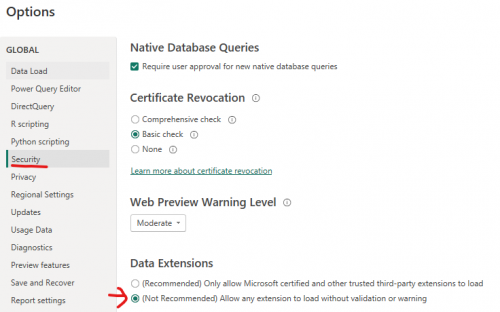
    1) make sure the security option is allowing it

    afe656dfe5b36dd1b82ffab59fe298de-huge-im

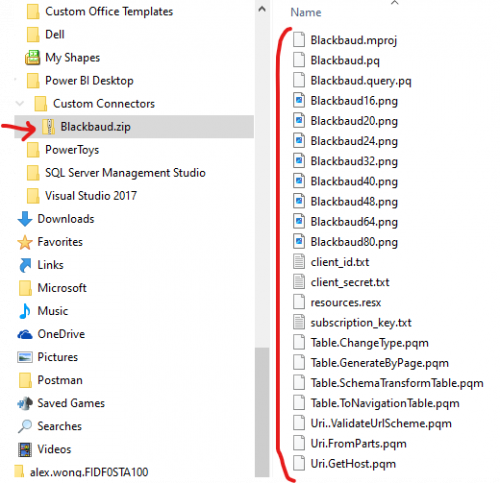
    2) your Blackbaud.mez file is correctly created

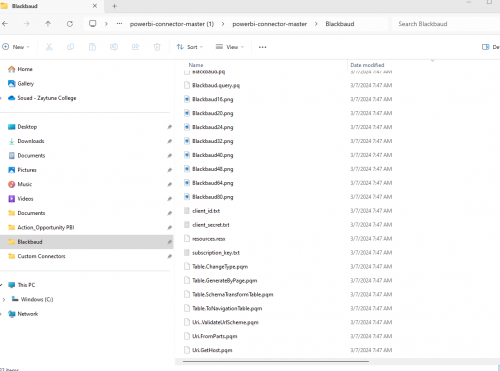
    the Blackbaud.mez file is actually a zip file where ONLY the files are zipped, no folder.

    If you rename the Blackbaud.mez file to Blackbaud.zip file and try to open like a zip, you should see all the files, no folder.

    84f18a8206712871d39ffc7064fbc7d8-huge-im

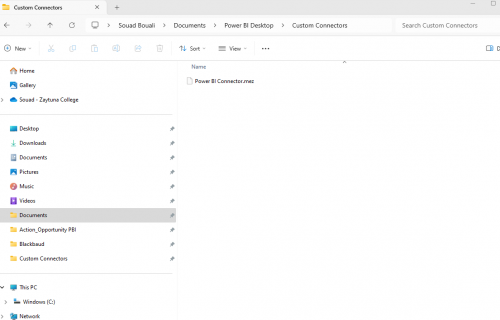
    3) saved to the correct folder location

    7a69d2a9d33d177502de6a89995f0e47-huge-im
  • Alex Wong
    Alex Wong Community All-Star
    Ninth Anniversary Kudos 5 Facilitator 3 bbcon 2025 Attendee Badge

    @Souad Bouali
    I have seen someone having problem before, and their issue was creating the zip file. They had the files in a folder call “Blackbaud” and they zip the Blackbaud folder. When when opening the Blackbaud.mez file like a zip file, he sees only the Blackbaud folder, and then have to click into the folder to see the files, that will not work.

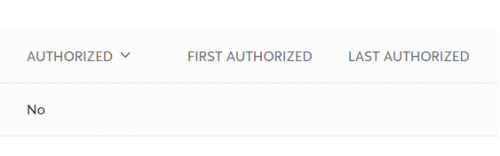
  • @Alex Wong I have the Power BI Connector.mez saved in Documents. I saved the application client ID, the Secret ID, Updated the REdirect URI, established the Scope to Limited access “Read” and even to Full Access. Also saved my subscripton access ID. Finally connected the app under “Manage” in MKTplace. in my application “view envronments”, it is confirmed connected, but under “Authorized” it is mentioned No", not sure how to fix that. Thank you for your help!

    f56462701745b54c2f35a21d4c11fa18-huge-im
    8b8cb707c8eb67b315b5cd3727b3e72f-huge-im
  • @Alex Wong Thank you. I had the 3 steps done correctly, but still Blackbaud is not showing up in pbi desktop.