I want to report a percentage of a column of its total. Does anybody know how to add it when building a report? The percentage variables are comparing a column to another column.
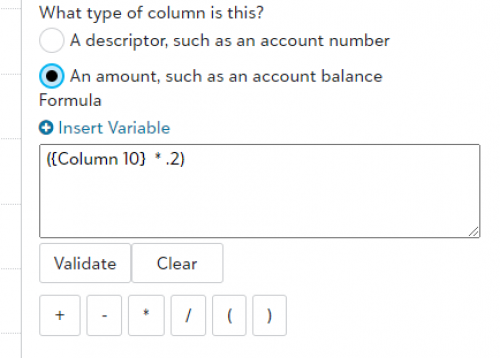
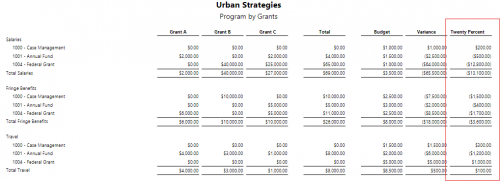
Hi @Sylvia Cook!You can do this by adding and editing a new column, utilizing the ‘Insert Variable’ option to select an existing column and then you can use the formula options below that to set up your percentage (see my example).
@Nikki BaldwinThanks Nikki. I was meaning to calculate the percentage of each line to the total of the column.
@Sylvia Cook this method will do that per line and the sub totals but did you mean that you wanted it to take a portion of all the columns' lines? If so, you could simply set it up as (‘column 3’ + ‘column 4’ + ‘column 5’ etc)*.2)
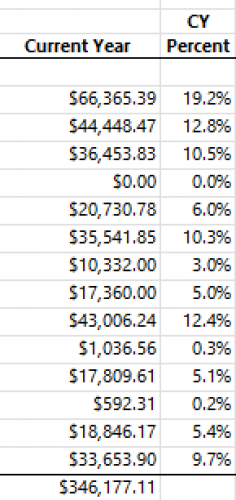
@Nikki Baldwin I am looking to calculate percentages like this so I don't have to export to Excel to add the percentage.
@Sylvia Cook, Ah thank you for clarifying, and appreciate your patience with my misunderstanding -- I see what you mean now. So no, we can't do that within the reporting columns (referencing a subtotal line and returning the percentage of that total). I did check into the Insight Designer functionality and I'm not seeing this as an option either because it can't reference the subtotal for the column to produce a new column and give its percentage of that subtotal. I would recommend Idea Bank suggestion and otherwise, keep exporting to excel where you can add that column. Sorry I couldn't be of more help!