Acknowledgement Issue when trying to use custom addressee/sals
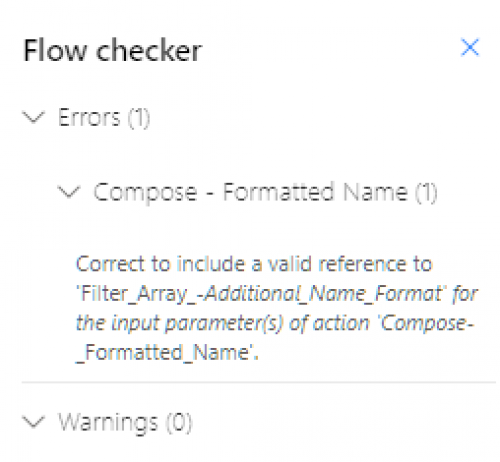
I have successfully setup the Power Automate flow for Acknowledgements and then successfully followed webinar to use Primary Addressee/Sals instead of Name, but I am now trying to follow the webinar to use “custom addressee sal” and I'm getting the following flow error:
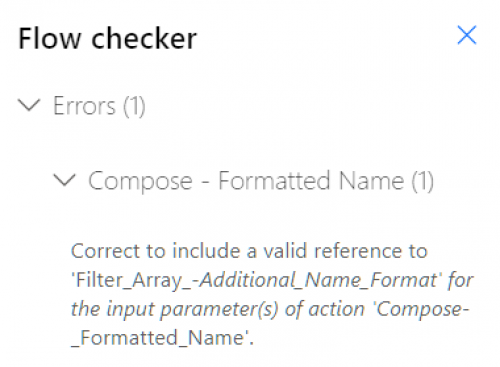
I double-checked to verify I had renamed each step, as instructed, and cannot figure out what this error is trying to tell me. What “valid reference” is it looking for and not finding?
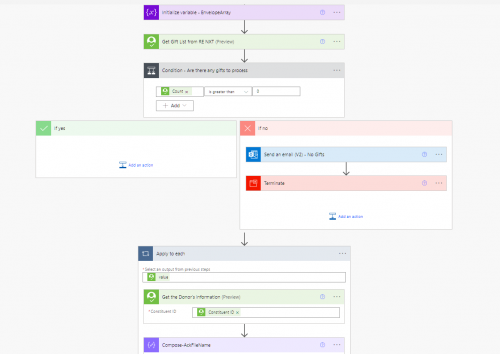
Below is that section of the flow. All worked until I added the last step of Compose - Formatted Name.
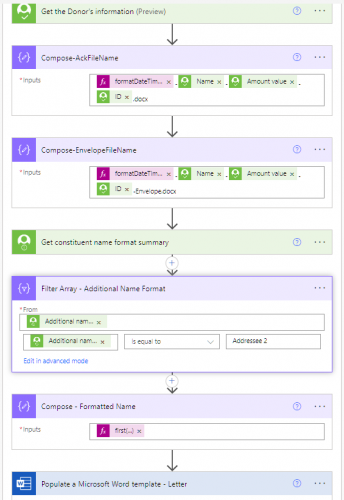
Thanks for any guidance, tips, other webinar to view. I also need to figure out how to do an if/then statement for the addressee and salutation if anyone has knowledge to share. Thanks!
Comments
-
@Sandra Ross - can you share what the ‘first’ expression includes?
0 -
0
-
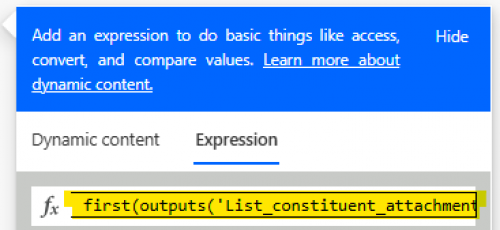
@Sandra Ross - Sorry for the confusion, that wasn't quite what I was looking for. If you click on the ‘first’ expression within your “Compose - Formatted Name” action, you'll get the dynamic content window. Copy the entirety of what's listed under the ‘expression’ tab, and post it here (the highlighted area in the screenshot below).
0 -

@Austen Brown let's try this…
0 -
@Sandra Ross - You're missing a ? between the end of the expression and the key/square brackets. Try: first(body('Filter_Array_-_Additional_Name_Format'))?['formatted_name']
0 -
0
-
@Sandra Ross - Power Automate errors are notoriously unhelpful. I plugged yours into ChatGPT and this is what it says -
The error message indicates that Power Automate is unable to find or reference a valid parameter named 'Filter_Array_-Additional_Name_Format' in the action 'Compose-_Formatted_Name'. This typically occurs when a variable, output, or reference within the flow has been renamed, deleted, or incorrectly configured.
The names within the error message don't match your flow screenshots, remember spaces are represented with underscores _. Try saving your flow, if you haven't done that recently. You can also try to re-set your session by refreshing the web page.1 -
Success - I had an extra space in the filter array name. Fixed that and I can now save the flow. Anyone have guidance on how to do expression for if/then? We have two custom addressees (one for married couple and one for singles). For instance, if Addressee 2 is null then use Addressee 1. All records have an Addressee 1 but not all have an Addressee 2. Thanks @Austen Brown for tips on resolving the flow checker.
0 -
@Sandra Ross - There are a few ways you could do this I'm sure - in all honesty @Alex Wong may know of a more straightforward way. I'd do this with a nested expression that contains expressions for: if, equals, empty. It looks something like this.
if(equals(empty([Addressee 2]),true), [Addressee 1], [Addressee 2])
Replace the underlined square brackets with the output of Addressee 2 & 1 accordingly.
If you want to learn more about nested expressions, and some other good expressions to know - check out this bbdevdays session from 2023:1 -
@Sandra Ross
I thought I was answering some addressee/salutation question just shortly ago, and then realize it's the same ask from https://community.blackbaud.com/forums/viewtopic/586/63844.In this post, now I can see a little better what you were trying to do with the additional screenshots.
It looks like you specifically have an addressee/salutation “type” of “Addressee 2” and if this isn't blank, use it otherwise use primary addressee.
so the condition is going to be on the filter array to ensure that you have an array element that matches to “type”="Addressee 2". you can do this by checking the length() of the Filter array is greater than 0
greater(length(body('Filter_Array_-_Additional_Name_Format')), 0)then put this condition into a if(condition, true, false) expression:
if(greater(length(body('Filter_Array_-_Additional_Name_Format')), 0), true, false)for true, you want to use the filtered Addressee 2, but since Filter Array returns an array even if from your knowledge there can ONLY be one Addressee 2 type. So to get the actual addressee, you need to use the first() expression.
first(body('Filter_Array_-_Additional_Name_Format'))?['formatted_name']for false, you want to use the primary addressee
outputs('Get_constituent_name_format_summary')?['body/primary_addressee/formatted_name']now putting it altogether:
if(greater(length(body('Filter_Array_-_Additional_Name_Format')), 0), first(body('Filter_Array_-_Additional_Name_Format'))?['formatted_name'], outputs('Get_constituent_name_format_summary')?['body/primary_addressee/formatted_name'])
Above expression assumes that your filter action is named Filter Array - Additional Name Format and the get constituent addressee/salutation action is named Get constituent name format summary
1 -
@Alex Wong Many thanks for the great guidance! I was successful in following your instructions. Very helpful!
0
Categories
- All Categories
- 6 Blackbaud Community Help
- 206 bbcon®
- 1.4K Blackbaud Altru®
- 394 Blackbaud Award Management™ and Blackbaud Stewardship Management™
- 1.1K Blackbaud CRM™ and Blackbaud Internet Solutions™
- 15 donorCentrics®
- 357 Blackbaud eTapestry®
- 2.5K Blackbaud Financial Edge NXT®
- 646 Blackbaud Grantmaking™
- 561 Blackbaud Education Management Solutions for Higher Education
- 3.2K Blackbaud Education Management Solutions for K-12 Schools
- 934 Blackbaud Luminate Online® and Blackbaud TeamRaiser®
- 84 JustGiving® from Blackbaud®
- 6.4K Blackbaud Raiser's Edge NXT®
- 3.6K SKY Developer
- 242 ResearchPoint™
- 118 Blackbaud Tuition Management™
- 165 Organizational Best Practices
- 238 The Tap (Just for Fun)
- 33 Blackbaud Community Challenges
- 28 PowerUp Challenges
- 3 (Open) Raiser's Edge NXT PowerUp Challenge: Product Update Briefing
- 3 (Closed) Raiser's Edge NXT PowerUp Challenge: Standard Reports+
- 3 (Closed) Raiser's Edge NXT PowerUp Challenge: Email Marketing
- 3 (Closed) Raiser's Edge NXT PowerUp Challenge: Gift Management
- 4 (Closed) Raiser's Edge NXT PowerUp Challenge: Event Management
- 3 (Closed) Raiser's Edge NXT PowerUp Challenge: Home Page
- 4 (Closed) Raiser's Edge NXT PowerUp Challenge: Standard Reports
- 4 (Closed) Raiser's Edge NXT PowerUp Challenge: Query
- 778 Community News
- 2.9K Jobs Board
- 53 Blackbaud SKY® Reporting Announcements
- 47 Blackbaud CRM Higher Ed Product Advisory Group (HE PAG)
- 19 Blackbaud CRM Product Advisory Group (BBCRM PAG)