Getting Operating Income and EBITDA into Reports





Hey everyone,
I am new to Financial Edge and trying to work through reporting changes for my organization.
I've arranged a new Chart Organizer with the new format that I want and have started formatting new reports. However, I can't find a way to get a Net Surplus/(Deficit) line to report BEFORE Depreciation and Amortization (i.e. I'm trying to get the equivalent of EBITDA into my reports.)
Is this system limited to reporting only one Net Surplus line? Or is there a way to add another one? I'd love to be able to add both Operating Income (before SG&A) as well as EBITDA into my reports.
Any help is greatly appreciated!
Kelly
Comments
-
@Kelly Burns
I don't believe so since the Income Statement report controls the net asset calculation. It's just an all or nothing button on the report, not something controlled by the Chart Organizer. Likely what you'd do is set up your report how you want it, but remove the mark for include net assets and run the report without it. Then export to excel and add in the net asset calculations the way you want.0 -
@Kevin Brazell Thank you! Not the answer I wanted and hard to imagine they built a reporting tool that is this inflexible, but I appreciate the help and response.
Kelly
2 -
@Kelly Burns
Hi Kelly! I had the same question when I first started using Blackbaud. I ended up adding an additional level to COA. The first Level (Operating Rev/Exp with Dep) calculates my margin after depreciation. However, the Operating Rev/Exp excludes the depreciation. When I run our income statement, I then select level 4. This seems to work, although I do have to export and manually add the expense to depreciation if I want to see the total expenses.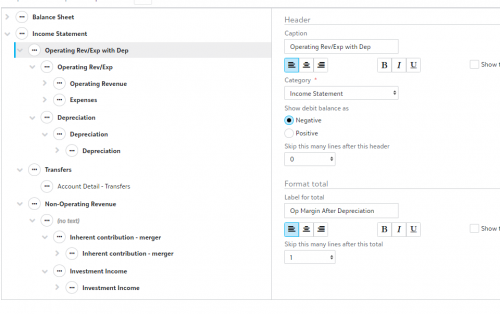 0
0 -
@Beckie Osterman Thank you! That is very helpful!
0







Categories
- All Categories
- New eTapestry Home Community
- New K-12 Community Home (TEST)
- New Higher Education Home Page (Test)
- New Impact Edge Community TEST
- New YourCause Community TEST
- New SKY Community TEST
- New Grantmaking TEST Community
- New Altru Test Community
- New bbcon Community - TEST
- 12 Blackbaud Agents for Good™
- New Raiser's Edge NXT Community
- 8 Blackbaud Community Help
- 223 bbcon®
- 1.4K Blackbaud Altru®
- 411 Blackbaud Award Management™ and Blackbaud Stewardship Management™
- 1.2K Blackbaud CRM™ and Blackbaud Internet Solutions™
- 16 donorCentrics®
- 361 Blackbaud eTapestry®
- 2.7K Blackbaud Financial Edge NXT®
- 688 Blackbaud Grantmaking™
- 604 Blackbaud Education Management Solutions for Higher Education
- 3.3K Blackbaud Education Management Solutions for K-12 Schools
- 954 Blackbaud Luminate Online® and Blackbaud TeamRaiser®
- 85 JustGiving® from Blackbaud®
- 7.1K Blackbaud Raiser's Edge NXT®
- 4K SKY Developer
- 258 ResearchPoint™
- 124 Blackbaud Tuition Management™
- 165 Organizational Best Practices
- 249 Member Lounge (Just for Fun)
- 40 Blackbaud Community Challenges
- 37 PowerUp Challenges
- 3 (Closed) PowerUp Challenge: Grid View Batch
- 3 (Closed) PowerUp Challenge: Chat for Blackbaud AI
- 3 (Closed) PowerUp Challenge: Data Health
- 3 (Closed) Raiser's Edge NXT PowerUp Challenge: Product Update Briefing
- 3 (Closed) Raiser's Edge NXT PowerUp Challenge: Standard Reports+
- 3 (Closed) Raiser's Edge NXT PowerUp Challenge: Email Marketing
- 3 (Closed) Raiser's Edge NXT PowerUp Challenge: Gift Management
- 4 (Closed) Raiser's Edge NXT PowerUp Challenge: Event Management
- 3 (Closed) Raiser's Edge NXT PowerUp Challenge: Home Page
- 4 (Closed) Raiser's Edge NXT PowerUp Challenge: Standard Reports
- 4 (Closed) Raiser's Edge NXT PowerUp Challenge: Query
- 829 Community News
- 3.1K Jobs Board
- 57 Blackbaud SKY® Reporting Announcements
- 47 Blackbaud CRM Higher Ed Product Advisory Group (HE PAG)
- 19 Blackbaud CRM Product Advisory Group (BBCRM PAG)