Working on creating new forms - option suddenly gone from Applications dropdown





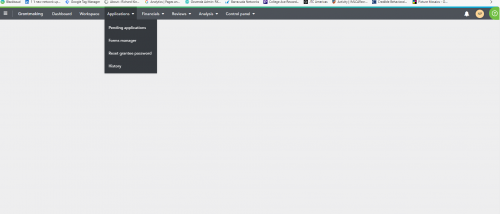
I was in the middle of working on a new RFP application and hit “save & close” to go back in and preview. Now, my screen looks like this - anyone else?
Comments
-
@Nikki Pirain yes same thing just happened to me! I logged completely out and got back in and it's working now.
0 -
@Tonya Conaway It keeps going back and forth between being there and not. It's really frustrating that they want us to learn how to use this & create things & then the system isn't giving us the option to even work on it.
0 -
@Tonya Conaway
This is happening AGAIN today AND I can't publish requirements - keeps giving me an error message. Just opened a case. Anyone else? This is ridiculous - I can't get any work done!!0 -
@Nikki Pirain @Tonya Conaway This support case has been escalated to internal teams and is being looked at with high priority. We appreciate your patience as this gets resolved.
1 -
I noticed this happens when I'm working on the application from the admin side as well as attempting to view the application on the same computer. Basically- whenever I try to test and edit the app on the same computer it happens. I've resorted to a separate email account for my test apps and using a separate computer to actually make the apps. @Nikki Pirain
0









Categories
- All Categories
- New YourCause Community TEST
- New SKY Community TEST
- New Grantmaking TEST Community
- New Altru Test Community
- New bbcon Community - TEST
- 12 Blackbaud Agents for Good™
- New Raiser's Edge NXT Community
- 7 Blackbaud Community Help
- 218 bbcon®
- 1.4K Blackbaud Altru®
- 409 Blackbaud Award Management™ and Blackbaud Stewardship Management™
- 1.2K Blackbaud CRM™ and Blackbaud Internet Solutions™
- 16 donorCentrics®
- 361 Blackbaud eTapestry®
- 2.7K Blackbaud Financial Edge NXT®
- 681 Blackbaud Grantmaking™
- 599 Blackbaud Education Management Solutions for Higher Education
- 3.3K Blackbaud Education Management Solutions for K-12 Schools
- 952 Blackbaud Luminate Online® and Blackbaud TeamRaiser®
- 85 JustGiving® from Blackbaud®
- 7K Blackbaud Raiser's Edge NXT®
- 3.9K SKY Developer
- 257 ResearchPoint™
- 123 Blackbaud Tuition Management™
- 165 Organizational Best Practices
- 247 Member Lounge (Just for Fun)
- 40 Blackbaud Community Challenges
- 37 PowerUp Challenges
- 3 (Closed) PowerUp Challenge: Grid View Batch
- 3 (Closed) PowerUp Challenge: Chat for Blackbaud AI
- 3 (Closed) PowerUp Challenge: Data Health
- 3 (Closed) Raiser's Edge NXT PowerUp Challenge: Product Update Briefing
- 3 (Closed) Raiser's Edge NXT PowerUp Challenge: Standard Reports+
- 3 (Closed) Raiser's Edge NXT PowerUp Challenge: Email Marketing
- 3 (Closed) Raiser's Edge NXT PowerUp Challenge: Gift Management
- 4 (Closed) Raiser's Edge NXT PowerUp Challenge: Event Management
- 3 (Closed) Raiser's Edge NXT PowerUp Challenge: Home Page
- 4 (Closed) Raiser's Edge NXT PowerUp Challenge: Standard Reports
- 4 (Closed) Raiser's Edge NXT PowerUp Challenge: Query
- 822 Community News
- 3.1K Jobs Board
- 57 Blackbaud SKY® Reporting Announcements
- 47 Blackbaud CRM Higher Ed Product Advisory Group (HE PAG)
- 19 Blackbaud CRM Product Advisory Group (BBCRM PAG)