I have recently created a dashboard in Power BI using NXT exported data, the next step is to embed the dashboard in NXT. I'm not sure how to go about making that connection. Does anyone have steps as how to embed a Power BI dashboard into NXT?
@Hillel Rosenzweigtake a look at here for more details
https://docs.blackbaud.com/microsoft-connectors-docs/microsoft-power-platform/power-bi/power-bi-addins
then @Ashley Moose created a form that helps you build sky add-in URL
https://community.blackbaud.com/forums/viewtopic/586/65850
@Alex WongThank you for you help! The form worked great! I followed the steps and still don't see the tile in NXT. I made the plugin connection, got the report name from Power BI and plugged it into the Add-in, etc. I think I missed a step as I haven't done anything yet with the secret key, do you have any ideas as to which step I'm missing?
@Hillel Rosenzweig
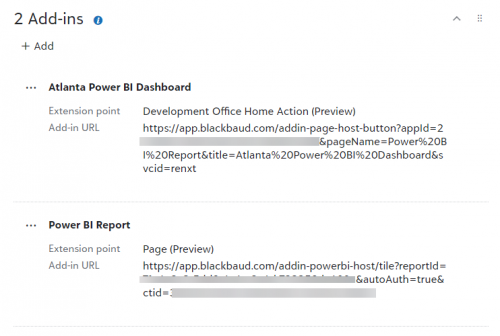
Can you provide a screenshot of your app? Please blur out the app ID. Should look something like this:
@Erik LeaverSure, thank you for helping!
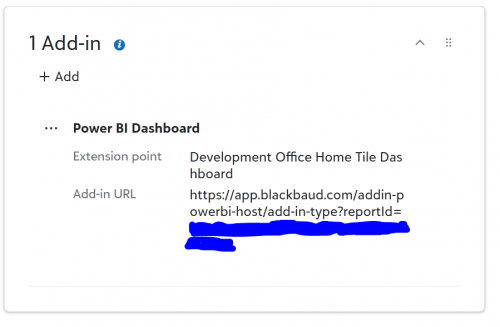
@Hillel Rosenzweigyour Add-in URL is incorrect.
you don't actually use add-in-type in the URL. The documentation explains what you should put as add-in-type, so if you want a TILE to be shown, you need to use tile instead of add-in-type in the URL.
https://app.blackbaud.com/addin-powerbi-host/tile?reportId=11111111111111111111111111111111111111
@Hillel Rosenzweig Alex is right - you need to modify the URL. That should give you a tile. If your report is too large for viewing in a tile, you'll want to change the extension point from a tile to a Page as in my example. You'll then need to create a button on the home page ("Development Office Home Action") as a 2nd add in.