Team:
Setting up eligibility quiz but not sure how to proceed. On legacy application EQ, an incorrect answer stopped the applicant from proceeding. How do I set up conditional logic to stop the applicant from moving forward?
@Kecia HagginsThe Eligibility responses are set up at the Program level.
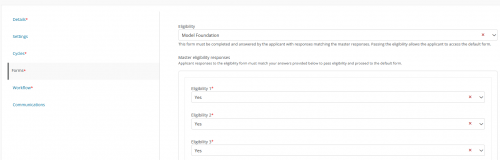
In the Program setup under Forms you select the Eligibility form that you want to use. It will then display the questions and you should select the Correct answers on that screen.
Applications > Program > Edit a Program > Forms
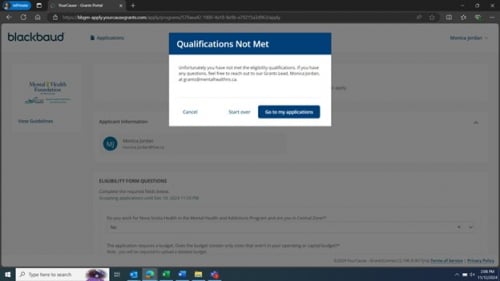
@Kecia Haggins It's easier than using conditional logic, just like @Jason Kelliher mentioned I'm testing it now, and is working - you can customize the declination pop-up applicants receive:
@Jason Kelliher In editing this, I am receiving an error that “The program's default form cannot be changed because there are applications tied to it. To update the current form, go to Custom Forms, create a revision, and publish your changes.” I created a revision, published my changes and I am not able to edit anything within the eligibility form. Secondary, it is frustrating to be ‘live testing’ my product, without the ability to delete or remove forms that are created in error.
@Leigh ClarkI would recommend that you open a case with the Blackbaud Support team. They will be able to respond qu8ickest and provide assistance.