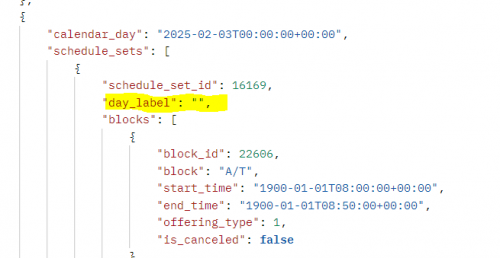
Is anyone using the Academic Master Schedule API? I'm looking to pull data down to show which class is on which day, and I came across this. However, the one data point I was really hoping to find is blank:
@Lindsey Bryant I use this API endpoint. When looking at mine, I see that many but not all have labels. Where the day label resides is within the schedule set for the data that is being returned. Go to Academics > Schedule Outline > Schedule Sets. Naturally, the schedule set ID number isn't visible on this page as far as I can tell, but I would go through your schedule sets (hopefully there aren't a million) and go to the Rotation tab and you'll see DAY LABEL. Likely, those fields are blank. LMK if this helps.
@Nick MarcheseThanks for pointing me to this. I updated this and pulled the data again, but it's still inconsistent. @Stephen Boyle could you double check the API and confirm it's pulling where Nick pointed me?
@Lindsey BryantSo strange. Did you check all of them? Haha. Obviously, Stephen can chime in too. Happy to help more if I can.
@Nick MarcheseI didn't go to the effort to add others as it should be consistent.
@Lindsey Bryant - I use this endpoint in several programs, so I did some testing in my environment. I was relieved to find that the day_label field was populated with data as expected.
@Brian Gray and @Nick Marchese thank you both for your response. I found what the issue is. I didn't realize I needed to update three schedule sets (due to how many we had configured) and that I needed to scroll down on the Rotation Tab to hit all days compared to when I was testing my date range.
Thanks for all the help!