The following post is from Andrea Fleisher, an account manager with Cathexis Partners, a Blackbaud Partner.Your TeamRaiser events and campaigns are meant for fundraising, right? So, it makes sense to encourage participants to make a donation (i.e., donate to their own fundraising campaign) as they register for the event or campaign.
Here are three simple ways to encourage participants to donate as part of the registration process:
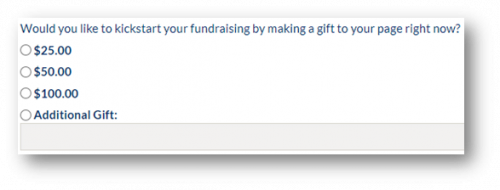
- Make sure the Additional Gift setting in TeamRaiser is turned on.
This is basic, but it’s necessary to allow participants to make their own donations. You can use wording such as “kickstart your fundraising” to motivate participants to give:
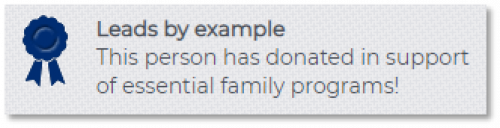
- Activate the self-donor badge.
Again, this is basic, but important. This is a great way to recognize and reward participants for their donations. Be sure to edit the wording of the badge to make sure it’s appropriate for your organization and campaign:
- Nudge non-donor participants to give.
Use conditional content in your auto-responders and other follow-up emails to encourage participants who have not made a gift to do so. Using this approach allows you to write two versions for each participant communication: one for the participant self-donor (without a nudge), and one for the non-self-donor (with a nudge).
Here’s how to use conditional content in communications: When you’re editing messages in TeamRaiser, click the “if” button on the tool bar. Then, select the “self donor” status. This will allow you to specify different text for participants who have made a donation and those who have not:


You can even link non-donors directly to the donation page that will credit the donation to their own fundraising page so that it shows up on their fundraising progress meter:
http://yoursite.convio.net/site/Donation2?df_id=xxxx&PROXY_ID=[[S1:cons_id]]&PROXY_TYPE=20&FR_ID=yyyy
(where yoursite.convio.net should be replaced with your domain, xxxx is the donation form ID, and yyyy is the TeamRaiser ID)
You can learn more about the importance of self-donations, as well as the percentage of participants giving a self-donation and the average self-donation in the
Blackbaud 2020 Peer-to-Peer Fundraising Study.
Discover more TeamRaiser tips and tricks in this on-demand webinar from Cathexis Partners. TeamRaiser Community CallJoin thought leaders and top event fundraising organizations for our TeamRaiser Community Call on April 7th as we share data-driven insights on digital and event fundraising, discuss best-practices, and highlight new ideas to adapt in today’s environment. We will be joined by some special guests from nonprofits who are planning hybrid events. Mark Becker from
Cathexis Partners will also be sharing some TeamRaiser tips and tricks for hybrid events.
Register here.