Here are the latest changes, updates, and new features for the
Education management products for June 27, 2023.
Billing management
Handle failed payments that need attention
Billing clerks now have more flexibility regarding handling failed payments. By selecting the new
Handle payment option on the
Failed payments page, Billing clerks can exclude payments from balance calculations and stop them from being applied to charges; for example, Billing clerks cannot
Apply charges to handled payments from the transactions record.
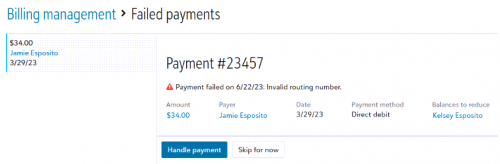 '
'To handle payments, go to the
Overview in
Billing management and select
Review failed payments under
Needs attention. Choose from the list of failed payments and select
Handle payment.
Core
Roles & tasks - early adopter program (EAP)
Platform managers at schools that are active in the early adopter program for the updated user interface for managing roles and role membership will notice the following enhancements:
- Platform managers can select a new Tasks tab, in addition to the Roles tab.
- The new tab shows task information in a searchable, sortable, and filterable “SKY” list. Use this new Tasks tab to view the Task name, ID, Domain, and Description. If the task is a “child” (such as Delete) then you’ll also see it’s corresponding “parent” (such as Edit).
- You can also use the new tab to view a list of members who have the task enabled for at least one of their roles.
- When platform managers view the list of Roles, the list:
- Includes hyperlinks for Reports and Members to their respective tabs in the role detail page.
- includes a column to indicate which domains are available for each role,
- includes a column that indicates which products and personas are enabled by tasks in the role.
- enables platform managers to filter the list by product and personas,
- hides Inactive roles by default. To show the roles, clear this filter.
- no longer displays the +New role button for the old Clone role experience; this is now deprecated.
- We updated the interface for adding members to a role. Instead of doing both groups and individuals from the same screen, we optimized the experiences for each separately (+ Add group vs. + Add individual).
- Some roles (such as grading manager) can limit access more granularly, such as by school level or group type. When you view the members of one of these roles, the list includes additional columns to indicate whether each user has full vs. restricted access to academics, activities, advisory, athletics, or dorms. If the access is restricted, then the list indicates which school levels or groups the member can access.
Although the Early Adopter Program is now full, you can contact your account representative if you would like to sign up for early access to the new Roles & Tasks experience ahead of General Availability.
API and integrations
School API and OneRoster API
School API
We’ve added two new endpoints, GET Types table types (BETA) and GET Types table values (BETA). These endpoints are in BETA and may be removed or replaced with a 90-day deprecation period.
GET Types table types (BETA) returns an array of table type objects as part of the value key; each type object is a key-value pair, represented with id and name properties:
-
id - (integer) The system record that either reflects a system-defined (denoted by a negative int, e.g., -200) or a user-defined (denoted by a positive int, e.g., 200) table type.
-
name - (string) The system-defined or user-defined descriptor for a table type.
GET Types table values (BETA) requires either a table id or a table name request parameter, but never both. Requests return an array of table value objects as part of the value key; each table value object contains four properties:
-
id – (integer) The system record for a table value.
-
name – (string) The user-defined descriptor for a table value.
-
abbreviation – (string) The user-defined abbreviated form of the table value name.
-
active – (boolean) Returns True if the table value can be selected in Education management or False if it is defined but not in use.
Table types and their values are managed under General settings in Core.
Use GET Types table types (BETA) to get the necessary request parameters for GET Types table values (BETA).
Subscribe to What's New
To receive email notifications when the What’s new update appears, make sure to subscribe to the Higher education community’s blog by logging into the community site and selecting the Subscribe button.
To manage your community subscriptions:
- Log into the community and locate your name and profile picture in the upper right corner.
- Select the drop-down arrow and select My Account.
- From the My Account page, select the Subscriptions tab and scroll down to the Blogs section.
- Locate Blackbaud Higher Education solutions Blog. If you want to be notified as soon as the What’s new content goes live on the community, select the Instant option. You can also opt for Daily and Weekly notifications.
- Scroll to the end of the page and select Save changes.
What's Recent
Missed any of our weekly releases? You can catch up on everything in our Month in Review blog posts, which cover every feature and update Education management releases each month.
