So you’re new to
Raiser’s Edge NXT or about to log in for the first time? As you start to use
Raiser’s Edge NXT through your browser or mobile device, it’s understandable if you’re unsure where to begin. If you’re a solicitor at your organization,
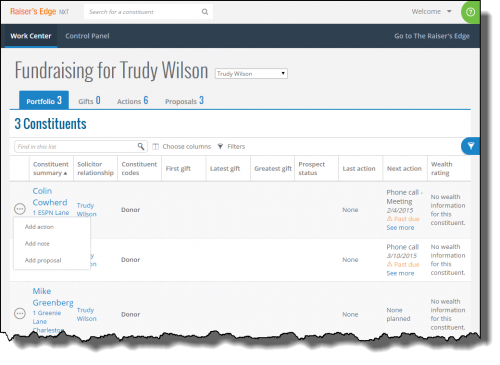
Work Center should be your primary hub in
Raiser’s Edge NXT, driven by your assigned constituents and activity. Think of
Work Center as the one-stop shop for everything you need to juggle all your relationships, actions, gifts, and proposals as you cultivate and secure gift opportunities. From here, you have easy access to full lists of your assigned relationships and related items. To help focus on only what you want, such as to analyze specific constituents or gifts or to plan for upcoming actions and proposals, you can filter your lists in
Work Center and customize their columns as necessary.
From
Control Panel, system administrators can select whether members of a security group can access
Work Center, including others’ work centers (such as for a fundraising manager). To set up
Work Center for solicitors at your organization, admins should invite everyone who manages constituent relationships or related activities — including volunteers who contact donors — to use
Raiser's Edge NXT and assign them to the appropriate security groups with work center rights. In the classic interface, each user should be linked to their constituent record and marked as a solicitor.
For more details about
Work Center, or
Raiser’s Edge NXT in general, we recommend you read
Get Started with Raiser’s Edge NXT. From within the web interface, you can also click the
? in the upper right corner for a deeper dive into
Help content, How-tos, and best practices for each list you work with in
Work Center, as well as quick access to additional resources such as Knowledgebase, Chat Support, and the Community.
