Raiser's Edge NXT updated earlier this week with several new features, including prospect research, Gift Aid, and enhanced proposal management!
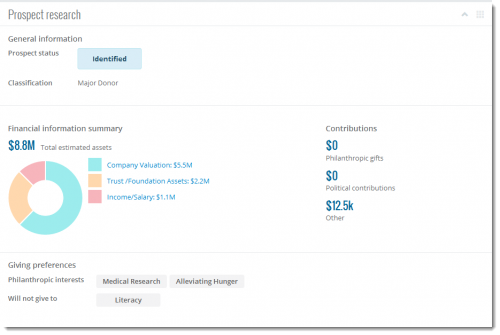
Prospect research. With
Prospect Research Management, you can now view basic details about a constituent as a prospective donor, including any known giving preferences and financial information, under
Prospect research on their record. With this information, you can better develop strategies to cultivate the relationship and determine the constituent's true giving potential.
 Gift Aid.
For those in the United Kingdom, you can now view Gift Aid details when you work with a full list of gifts, such as in
Work Center or when you click
Work with gifts on a constituent's record. To view whether a gift has a declaration and qualfies for Gift Aid, the amount claimed from Her Majesty's Revenue and Customs (HMRC) for a gift, and the total value of a gift including Gift Aid, you can now include the
Gift Aid and
Gross amount columns. For more information about Gift Aid in
Raiser's Edge NXT, see
Gift Aid Help.
Mark proposals as inactive or active. With
Prospect Research Management, you use proposals to plan and track efforts to cultivate relationships and secure major gift opportunities. To keep a proposal for historical reference but remove it from lists, such as if you disqualify the prospect after multiple attempts to contact them, you can now click
Mark inactive on the proposal's record. To resume the effort, such as when the prospect finally replies with a favorable response, click
Mark active.
Add and edit proposal actions. To save and track the tasks and interactions performed to support a proposal effort, you can now click the proposal's menu on the
Proposal tab in
Work Center and select
Add action. To update the action, such as to change its date or add a note, you can now select its menu under
Actions on the proposal's record and select
Edit action.
For more information about these new features and enhancements, check out the
What's New Help.