With this week's update to
Raiser's Edge NXT, you can now do more from
Work Center to manage your constituent relationshps from one central location (and make sure you see only what you should).
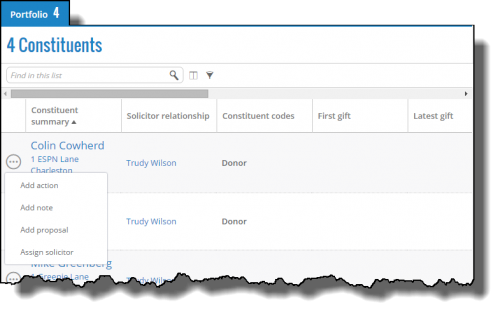
Assign solicitors from Work Center. From
Work Center, you can now create solicitor assignments from the
Portfolio list. To assign a constituent to a solicitor, select their menu and select
Assign solicitor. For more information, check out the
Solicitor Assignments Help.
In future releases, you'll be able to manage these assignments from
Work Center and quickly identify which constituents aren't assigned to anyone.
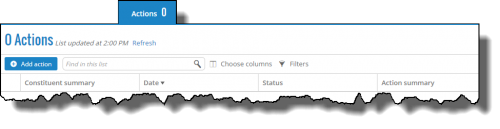
Add actions from the Actions list in Work Center. From
Work Center, you can now quickly add actions to the
Actions list. To add an action, simplhy select
Add action and search for who to add the action to. For details, see the
Actions Help.
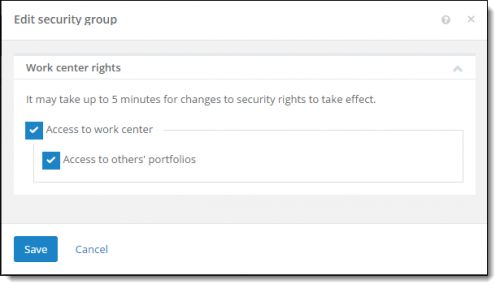
 Allow access to other's Work Center porfolios.
From a security group's record, you can choose whether its members can access
Work Center, including other fundraiser's porfolios. To access others' portfolios, the security group must now also have access to
Work Center. Previously, you could choose to allow access to other fundraisers' portfolios without access to
Work Center (which was highly unlikely).
 Gift security by fund or constituent code.
To help protect donor information, gifts and totals — such as in
Work Center or under
Giving on a constituent's record — now include only giving you should view based on the funds they apply to or the constituent codes of their donors.
Portfolio list security by fund, constituent code, or action type. To help focus on only what's important to you, the
Portfolio list in
Work Center now displays only information you should view based on various criteria: When you filter the
list, only constituent codes you can view appear as options; the
First gift,
Latest gift, and
Greatest gift columns display only gifts applied to funds you can view; and the
Last action and
Next action columns display only actions with types you can view. (If you manage a relationship that no longer appears in your porfolio, contact your system admin or supervisor to determine whether your security rights need adjusted or if the constituent should be reassigned.)
For more information about these features, check out the
What's New Help!