In this week's update of
Raiser's Edge NXT, you have new functionality to ease many aspects of managing relationships with constituents, including actions, soft credits, and — with
Prospect Research Management — proposals.
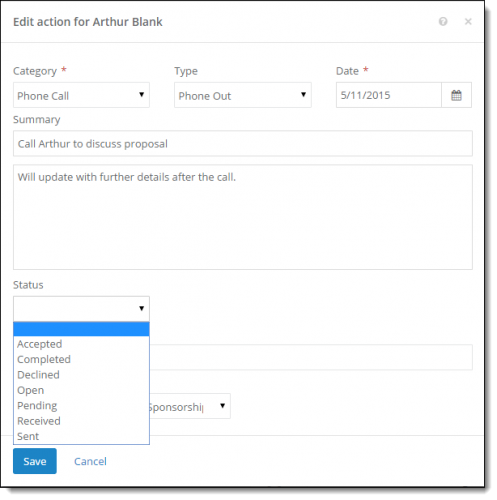 Track an action's progress with custom statuses.
 To help track the progress of a task or interactions, you can now save a custom action status instead of the default completion status. For example, your organization can tailor action statuses to suits its specific workflow or detailed reporting. (
Admins! To set up action statuses for your organization, you'll need to choose whether to use action status codes and configure any custom statuses.) For more information, check out the
Action Statuses Help.
Manage all proposals for a constituent. With
Prospect Research Management, you can manage proposal efforts to cultivate relationships with prospective donors and major givers. To view and manage a full list of a constituent's proposals, you can now select the total under
Proposals on their record. For more information, see the
Proposals Help.
Edit custom fields for proposals. From a proposal's record, you can now edit the details of a custom field, such as the type of information it collects. Simply select
Edit custom field from the field's menu under
Custom fields, adjust its information as necessary, and select
Save.
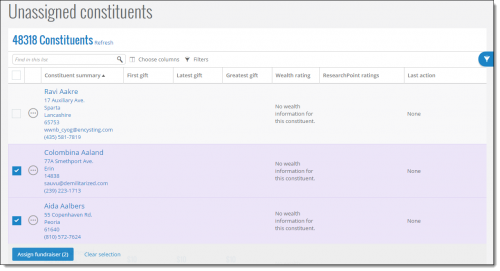 Easily assign multiple constituents to a fundraiser.
 From the
Unassigned constituents list, you can now assign multiple relationships to a fundraiser at the same time. Simply select the constituents in the list and then select
Assign fundraiser. For more information, check out the
Unassigned Constituents Help.
View when the Portfolio and Gifts lists updated. In
Work Center, you can now view when the
Portfolio and
Gifts lists last updated. These lists automatically update with new and edited information periodically. (FYI, it may take at least 30 minutes for information added or updated about constituents or gifts in the database view to appear in the web view.)
View soft credit details in lists. For clarity, soft credit information now appears more consistently in lists.
- If you manage relationships with both the donor and soft credit recipient of a gift, it now appears only once in the Gifts list in Work Center. In the Constituent summary column, you can view information about the donor. To view who receives soft credit for a gift (and how much credit they receive), include the Soft credit column.
- In a constituent's full list of gifts, you can now view the total amount of a gift they receive soft credit for in the Amount column. To view how much soft credit the constituent receives for the gift, include the Soft credit column. To view who gave the gift the constituent receives credit for, include the new Donor column.
For more information about these features and enhancements, check out the
What's New Help.
Enjoy!
