***D
usting off this blog post from a while back for all the system admins out there who are new to
Raiser's Edge NXT. Welcome to the Community, here are some tips to help you get everyone in your organization into the application!***
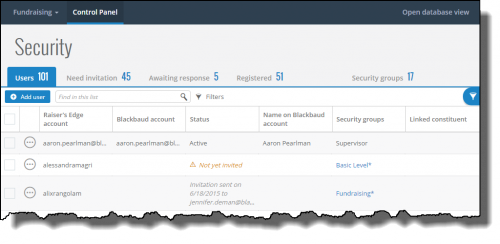
From
Control Panel, system admins and other supervisory types can easily send invitations and add users to get people at your organization into
Raiser's Edge NXT. They can also play bouncer and disconnect accounts as necessary to block access (or just fix incorrectly configured users).
To get someone who already uses the database view into the web view, simply select
Send invitation from their menu in the
Users or
Need invitation list, enter their email address, and select
Send invitation. To send multiple invitations at once, select the recipients in the list and then select
Send invitations. These users will receive an email invitation they must confirm to log into
Raiser's Edge NXT and automatically have the same security groups as they have in the database view.
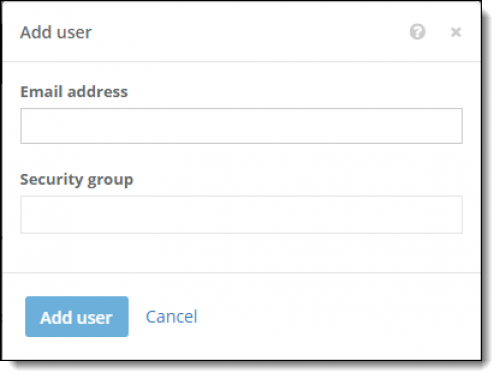 To get someone completely new into Raiser's Edge NXT
, select
Add user on any list of users, enter the person's email address, choose which security groups they should be a member of, and select
Add user. These users will receive an email message they must confirm to create their Blackbaud account (if necessary) and log into
Raiser's Edge NXT.
To send a duplicate invitation, such as if the email delivery fails or the recipient can't find their invitation, select
Send another invitation from the user's menu in the
Users or
Awaiting response list, edit the email address if necessary, and select
Send invitation.
To cancel an invitation, such as if you inadvertently send one to the wrong email address or user, select
Cancel invitation from the recipient's menu in the
Users or
Awaiting response list and then select
Cancel invitation.
To disconnect a Raiser's Edge account from its Blackbaud account, such as if you mistakenly link incorrect accounts or need to block the user's access to data in
Raiser's Edge NXT, select
Disconnect accounts from the user's menu in the
Users or
Registered list. When you disconnect accounts, the Blackbaud account holder can't access data available to the
Raiser's Edge account, and their status changes to Not yet invited.
For more information, check out the
Users and Invitations Help. To troubleshoot any issues, such as if someone didn't get their invitation or can't log in despite an invitation, see
Issues with Invitations Help.
