As we put the finishing touches on
some upcoming features, you shouldn't see anything new in
Raiser's Edge NXT this week. Instead, take this time to explore the application on your smart phone or tablet...
especially if you've previously only accessed it through your desktop or laptop computer. A big benefit of
Raiser's Edge NXT is that you can access it wherever — and
whenever — you need it on a mobile device. Why wait to get back to your desk to capture an engaging and positive interaction you had with a donor at the local coffee shop, when you can do so at the table through your tablet or phone as you finish the last sips of your caramel cinnamon latte?
 Raiser's Edge NXT
 is designed to be
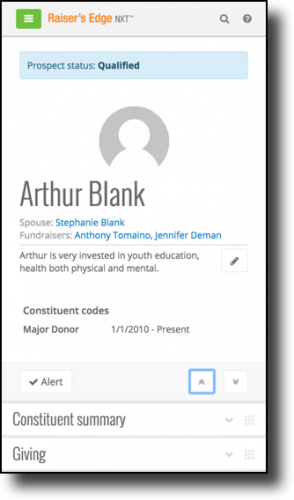
responsive, which is a fancy word meaning that it automatically adjusts to fit the screen you access it through. For example, on a constituent's record, the sections stack so you can peruse them top-to-bottom with a simple swipe up or down. That means that all that rich information about a donor is just as easily accessible and readable on-the-go through your smart phone as it is at your desk and on your monitor. As you manage a relationship through your mobile device (or, for that matter, your computer), keep these tips and tricks in mind.
Focus on only what you want. A constituent's record can hold a lot of information! While it's all good to know, you may only care about specific details at any given moment. To help focus on only what you want, tap
Collapse all (the two up arrows) to close all the sections of the record, and then scroll and expand only the sections you need (such as
Constituent summary,
Giving,
Notes and actions, and so on).
Add a bookmark. To quickly get into
Raiser's Edge NXT through your device, save it as bookmark in your mobile browser or on your Home page. When you add a bookmark to your Home page,
Raiser's Edge NXT appears with all your other apps, just like
Facebook,
Angry Birds, and
Blackbaud MobilePay.
- On your iPhone or iPad, open Raiser's Edge NXT in Safari, tap Share (the box with an arrow coming out of it) and then Add to Home Screen.
- On your Android device, open Raiser's Edge NXT in Chrome, tap Menu (the three vertical dots) and then Add to homescreen.
Make contact. On your phone, a constituent's contact information becomes all that more powerful. Need directions to their house or place of business for a quick meeting? Need to call to let them know you're stuck in traffic? Need to send a personal email afterward to thank them for the meeting and their patience with your delayed arrival? Simply tap a constituent's contact information to easily map a street address, call a phone number, or send an email message, all through your smart phone.
With
Raiser's Edge NXT, your fundraising efforts and relationships are all literally at your fingertips. Take a moment to experience it through your mobile device and find new ways to engage your donors and fund-raise while on the move. (It may be as addicting as
Candy Crush Saga.)