This week,
Raiser's Edge NXT updates with some nice enhancements to lists, with new constituent tag filter options and gift columns (and a new, easier-to-skim default state for filters).
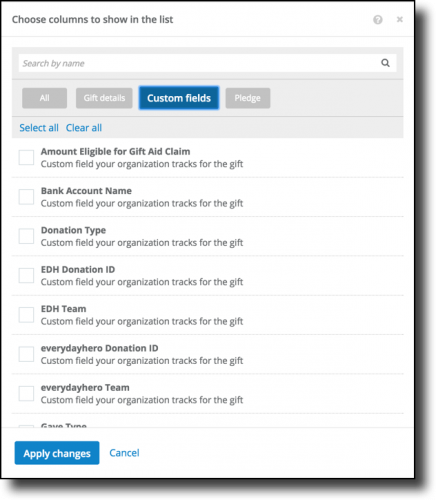 New custom field columns for gift lists.
 To view specialized information your organization tracks about gifts, such as details about their teams or donations in
everydayhero, you can now include columns for custom fields in lists of gifts, such as in
Work Center or of a constituent's giving. To include a custom field in a list, select
Choose columns and choose which details to view under
Custom fields. (In the database view, you can manage a gift's custom fields on the
Attributes tab of its record.)
New tag filter options for constituent lists. To view constituents with certain situations such as lapsed giving and/or no interactions, you can now filter lists of constituents — such as your
Portfolio or
Unassigned constituents list — to include only those who have all — or any — of specific tags.
(Previously, you could only include constituents with any of a set of tags.)
- To include constituents with specific combinations of tags — such as Lapsed and No contact — select Filters, choose "All of these tags" under Tagged with, and choose which tags to include.
- To include constituents with any of a set of tags — such as Lapsed or No contact — select Filters, choose "Any of these tags" under Tagged with, and choose which tags to include.
For information about other filter options, check out the
Constituent Filters Help.
New default state for filters. To help you skim the filters available for a list, they now appear collapsed — except for the first set — by default. (
Raiser's Edge NXT automatically remembers your selections as you expand and choose filter options for future use, so select
Clear to quickly return filters to their default state.)
For more details about the features in this and previous weeks' releases, see the
What's New and
What's Recent Help.
Enjoy!
