What's New in Raiser's Edge NXT the week of December 15
Raiser's Edge NXT recently released several new features and enhancements, including additional information on gift records and attachments. This week is the last big update to Raiser's Edge NXT for the year, so think of these features as our holiday present to you!
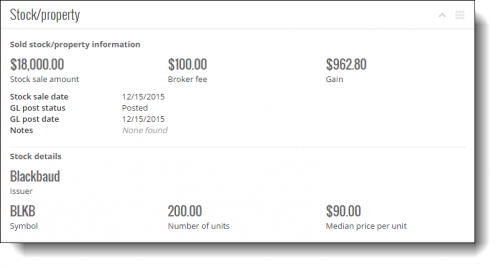
Stock/property gift details. Donors may contribute stock certificates, land, estates or other property, which your organization may opt to keep or sell to benefit your fundraising efforts. On the record of a gift of stock or property, you can now view pertinent details — such as its value when you received and sold it — under Stock/Property. For more information, see the Stock/Property Gifts Help.
Pledge summary and burndown. Pledges are commitments to donate in the future with a single gift or through multiple installments, such as a $1200 gift spread out as 12 monthly payments of $100. On the record of a pledged gift, you can now view details about how much the donor already paid and has left to pay — as well as details about their payment installments — under Pledge summary and Pledge burndown. For more information, check out the Pledges Help.
Batch numbers on gift records. To quickly enter large groups of gifts at once, your organization may enter them as batches in the database view. At the top of a gift's record in the web interface, you can now view which batch it was entered in. For details, see the Gift Overview Help.
Attachment descriptions and dates. To help build a complete picture of your constituents, you can attach collateral — such as correspondence, artifacts from prospect research, and pictures or videos from events — to their records. For each attachment, you can now view when it was added to the constituent's record or transferred as media from the database view. For attachments added as media in the database view, you can also now view their descriptions for additional details or context. For more information, see the Attachments Help. (In the future, you'll be able to edit an attachment's details and add new attachment types on the fly! You'll also be able to add attachments to actions, such as to associate interactions wtih meaningful material like contact reports or correspondence.)
For more information about these features, or to catch up on recent releases, see the What's New Help or What's Recent Help. Enjoy, and best of luck with the holiday giving season!

Stock/property gift details. Donors may contribute stock certificates, land, estates or other property, which your organization may opt to keep or sell to benefit your fundraising efforts. On the record of a gift of stock or property, you can now view pertinent details — such as its value when you received and sold it — under Stock/Property. For more information, see the Stock/Property Gifts Help.Pledge summary and burndown. Pledges are commitments to donate in the future with a single gift or through multiple installments, such as a $1200 gift spread out as 12 monthly payments of $100. On the record of a pledged gift, you can now view details about how much the donor already paid and has left to pay — as well as details about their payment installments — under Pledge summary and Pledge burndown. For more information, check out the Pledges Help.
Batch numbers on gift records. To quickly enter large groups of gifts at once, your organization may enter them as batches in the database view. At the top of a gift's record in the web interface, you can now view which batch it was entered in. For details, see the Gift Overview Help.
Attachment descriptions and dates. To help build a complete picture of your constituents, you can attach collateral — such as correspondence, artifacts from prospect research, and pictures or videos from events — to their records. For each attachment, you can now view when it was added to the constituent's record or transferred as media from the database view. For attachments added as media in the database view, you can also now view their descriptions for additional details or context. For more information, see the Attachments Help. (In the future, you'll be able to edit an attachment's details and add new attachment types on the fly! You'll also be able to add attachments to actions, such as to associate interactions wtih meaningful material like contact reports or correspondence.)
For more information about these features, or to catch up on recent releases, see the What's New Help or What's Recent Help. Enjoy, and best of luck with the holiday giving season!
0
Categories
- All Categories
- 6 Blackbaud Community Help
- 210 bbcon®
- 1.4K Blackbaud Altru®
- 395 Blackbaud Award Management™ and Blackbaud Stewardship Management™
- 1.1K Blackbaud CRM™ and Blackbaud Internet Solutions™
- 15 donorCentrics®
- 360 Blackbaud eTapestry®
- 2.5K Blackbaud Financial Edge NXT®
- 649 Blackbaud Grantmaking™
- 567 Blackbaud Education Management Solutions for Higher Education
- 3.2K Blackbaud Education Management Solutions for K-12 Schools
- 937 Blackbaud Luminate Online® and Blackbaud TeamRaiser®
- 84 JustGiving® from Blackbaud®
- 6.5K Blackbaud Raiser's Edge NXT®
- 3.7K SKY Developer
- 247 ResearchPoint™
- 119 Blackbaud Tuition Management™
- 165 Organizational Best Practices
- 239 The Tap (Just for Fun)
- 33 Blackbaud Community Challenges
- 31 PowerUp Challenges
- 3 (Open) PowerUp Challenge: Data Health
- 3 (Closed) Raiser's Edge NXT PowerUp Challenge: Product Update Briefing
- 3 (Closed) Raiser's Edge NXT PowerUp Challenge: Standard Reports+
- 3 (Closed) Raiser's Edge NXT PowerUp Challenge: Email Marketing
- 3 (Closed) Raiser's Edge NXT PowerUp Challenge: Gift Management
- 4 (Closed) Raiser's Edge NXT PowerUp Challenge: Event Management
- 3 (Closed) Raiser's Edge NXT PowerUp Challenge: Home Page
- 4 (Closed) Raiser's Edge NXT PowerUp Challenge: Standard Reports
- 4 (Closed) Raiser's Edge NXT PowerUp Challenge: Query
- 784 Community News
- 2.9K Jobs Board
- 53 Blackbaud SKY® Reporting Announcements
- 47 Blackbaud CRM Higher Ed Product Advisory Group (HE PAG)
- 19 Blackbaud CRM Product Advisory Group (BBCRM PAG)
