What's New in Raiser's Edge NXT the week of January 12
This week, Raiser's Edge NXT resumes its frequent updates with a handful of new features and enhancements ranging from attachments and proposals to Work Center security. A little something for everyone!
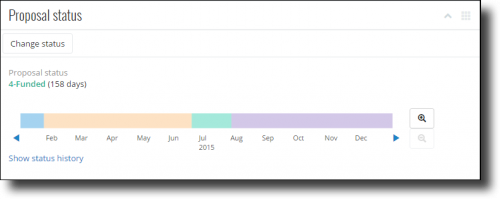
Manage a proposal's status. With Prospect Research Management, you can use proposals to plan and track efforts to build relationships with prospects and secure gift opportunties. From a proposal's record, under Proposal status, you can now update its status in your solicitation process, quickly see how long it's had the current status, and scroll through its history. (Note that since this feature is new, the proposal's status history initially includes only the current status, which appears as a recent change. For more accurate history, we recommend you edit the previous statuses or the current status date as necessary.) For more information, see Proposal Status Help.
Apply multiple attachment types (and filter by them). In addition to names and descriptions, types can help identify attachments based on how your organization categorizes them, such as Pictures, Videos, or News clippings. You can now apply multiple types to an attachment as necessary. To quickly find an attachment on a record, you can now also filter them by type, such as to view only Contact reports or News clippings. (Admins can also add new types on the fly when they add or edit attachments. Note that types added in the web interface don't appear in the database view.) For more information, check out the Attachments Help.
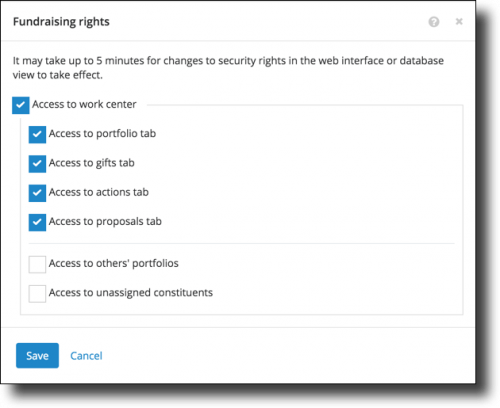
Manage access to tabs in Work Center. To help fundraisers focus on what matters most to them, system admins can now choose which tabs in Work Center someone can access (based on their security group), such as for those who manage constituent relationships and actions but not gifts. Previously, you could only grant access to Work Center as a whole. (Currently, everyone with access to Work Center can view all its tabs by default. To remove a tab for a security group, select Edit rights under Fundraising rights on its record in Control Panel, and choose which tabs its members work with.) For details, see Fundraising Rights Help.
For more information about these features, or to catch up on previous releases from the past year, check out the What's New Help or What's Recent Help. Enjoy!

Manage a proposal's status. With Prospect Research Management, you can use proposals to plan and track efforts to build relationships with prospects and secure gift opportunties. From a proposal's record, under Proposal status, you can now update its status in your solicitation process, quickly see how long it's had the current status, and scroll through its history. (Note that since this feature is new, the proposal's status history initially includes only the current status, which appears as a recent change. For more accurate history, we recommend you edit the previous statuses or the current status date as necessary.) For more information, see Proposal Status Help.Apply multiple attachment types (and filter by them). In addition to names and descriptions, types can help identify attachments based on how your organization categorizes them, such as Pictures, Videos, or News clippings. You can now apply multiple types to an attachment as necessary. To quickly find an attachment on a record, you can now also filter them by type, such as to view only Contact reports or News clippings. (Admins can also add new types on the fly when they add or edit attachments. Note that types added in the web interface don't appear in the database view.) For more information, check out the Attachments Help.
Manage access to tabs in Work Center. To help fundraisers focus on what matters most to them, system admins can now choose which tabs in Work Center someone can access (based on their security group), such as for those who manage constituent relationships and actions but not gifts. Previously, you could only grant access to Work Center as a whole. (Currently, everyone with access to Work Center can view all its tabs by default. To remove a tab for a security group, select Edit rights under Fundraising rights on its record in Control Panel, and choose which tabs its members work with.) For details, see Fundraising Rights Help.For more information about these features, or to catch up on previous releases from the past year, check out the What's New Help or What's Recent Help. Enjoy!
0
Categories
- All Categories
- 6 Blackbaud Community Help
- 206 bbcon®
- 1.4K Blackbaud Altru®
- 393 Blackbaud Award Management™ and Blackbaud Stewardship Management™
- 1.1K Blackbaud CRM™ and Blackbaud Internet Solutions™
- 15 donorCentrics®
- 356 Blackbaud eTapestry®
- 2.5K Blackbaud Financial Edge NXT®
- 638 Blackbaud Grantmaking™
- 557 Blackbaud Education Management Solutions for Higher Education
- 3.1K Blackbaud Education Management Solutions for K-12 Schools
- 929 Blackbaud Luminate Online® and Blackbaud TeamRaiser®
- 82 JustGiving® from Blackbaud®
- 6.4K Blackbaud Raiser's Edge NXT®
- 3.6K SKY Developer
- 239 ResearchPoint™
- 117 Blackbaud Tuition Management™
- 163 Organizational Best Practices
- 237 The Tap (Just for Fun)
- 32 Blackbaud Community Challenges
- 25 PowerUp Challenges
- 3 (Open) Raiser's Edge NXT PowerUp Challenge: Standard Reports+
- 3 (Closed) Raiser's Edge NXT PowerUp Challenge: Email Marketing
- 3 (Closed) Raiser's Edge NXT PowerUp Challenge: Gift Management
- 4 (Closed) Raiser's Edge NXT PowerUp Challenge: Event Management
- 3 (Closed) Raiser's Edge NXT PowerUp Challenge: Home Page
- 4 (Closed) Raiser's Edge NXT PowerUp Challenge: Standard Reports
- 4 (Closed) Raiser's Edge NXT PowerUp Challenge: Query
- 772 Community News
- 2.9K Jobs Board
- 53 Blackbaud SKY® Reporting Announcements
- 47 Blackbaud CRM Higher Ed Product Advisory Group (HE PAG)
- 19 Blackbaud CRM Product Advisory Group (BBCRM PAG)
