This week,
Raiser's Edge NXT updates with new features and enhancements so you can track rich details about interactions, proposal efforts, and constitiuent education history. With this release, you can also easily filter lists to include only giving within specific ranges and manage proposals from a constituent's record!
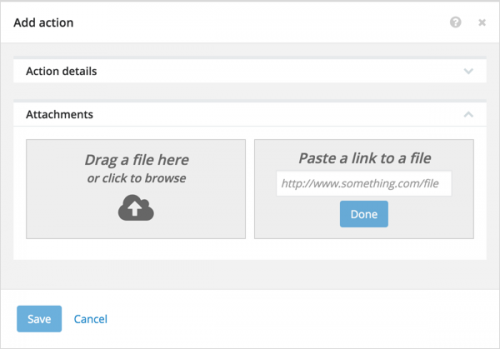 Add attachments to actions.
 To help build a complete view of your tasks and interactions, you can now upload or link images, videos, PDFs, Microsoft
Word documents and
Excel spreadsheets, and other files — such as a contact report from a meeting with a major donor — to actions. (To attach files an existing task or interaction, simply edit the action.)
As these attachments live in the cloud, you can:
- Quickly upload files to an action.
- Easily access files across multiple devices.
- Open and work with files in their native applications such as Microsoft Office or Adobe Acrobat.
For more information, see
Attachments Help.
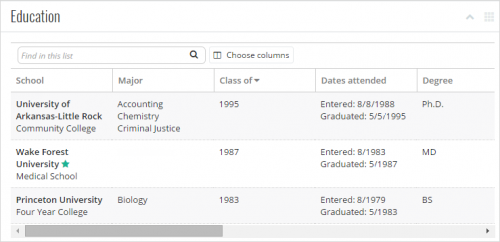 View additional education information.
 To enhance your fundraising efforts, you can develop education histories of constituents. Under
Education on a constituent's record, you can now view details such as where and when they attended school, whether they graduated from each
alma mater, with what degrees and fields of study. With
Alumni Tracking, you can view which school is marked as primary, such as where the constituent most recently attended, or the school most associated with your organization. For more information, check out
Education Help.
Filter lists by a range of gift amounts. To better analyze giving, you can now include a range of amounts to filter lists of constituents or gifts by how much they gave you organization.
- To filter a list of constituents, select Filters and, under Giving, choose the type of giving to include, select Between, and enter the range of amounts to include. For more information, see Constituent List Filters Help.
- To filter a list of gifts, select Filters and, under Gift amount, select Between and enter the range of amounts to include. For more information, see Gift List Filters.
(BTW, if you select Between and enter only the first amount, the list includes gifts or giving greater than or equal to that amount. If you enter only the second amount, gifts or giving less than or equal to that amount appear.)
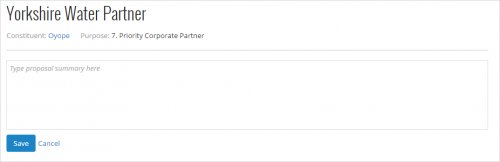 Pin summary notes to proposals.
 With
Prospect Research Management, you can use proposals to plan and track efforts to build relationships with prospects and secure gift opportunities. To help cultivate relationships, you can now pin a note to a proposal record to provide a high-level overview or additional details about the plan. To pin a summary notes to a proposal record, select
Add summary note, enter the details, and select
Save. For more information, see
Summary Notes Help.
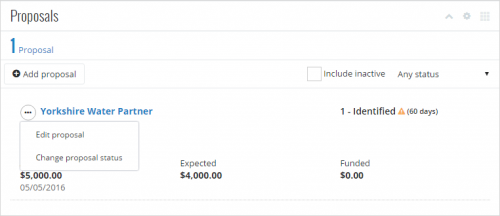 Manage proposals from constituent records.
 To quickly edit or change the status of a proposal, you can now select its menu under Proposals on the constituent's record. For more information, check out
Proposal Records Help.
For more information about these new features, or to catch up on previous releases, see
What's New Help or
What's Recent Help.
Enjoy!
