What's New in Raiser's Edge NXT the Week of April 5
This week, Raiser's Edge NXT updates with additional details about how your gifts relate to each other and new filter options so you can better include records based on timeframe or constituent giving.
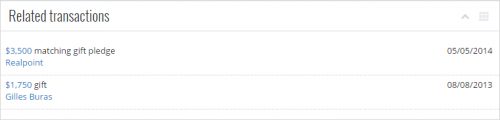
View a gift's related transactions. On a gift's record, you can now view information about other, associated gifts — such as a payment's original pledge or matching gift commitment — under Related transactions. For each transaction, you can view the amount and type of gift received, who gave it, and when your organization received it. For more details about a matching gift, pledge, recurring gift, planned gift, write-off, or associated payment, select its amount to view its record. (In the future, you'll be able to view records of related event registrations and membership dues as well.) For information about a donor, select their name to view their record. For more information, see Gift Records Help.
Filter constituents, actions, and proposals by date range. When you work with lists, you can filter their records by a period of time, such as This fiscal year or Last week. In lists of constituents, actions, or proposals, you can now also filter records by a range of dates. To filter based on this detail, select Filters and, in the time period filter, select "Specific range," enter the start and end dates to include, and select Apply filters. (If you select "Specific range" and enter only a start date, the list includes records from that date or after; only an end date, those from that date or earlier appear.)
Filter constituents by any gift. You can now filter lists of constituents by how much they gave in a single gift, such as those who gave a gift greater than or equal to $1,000. To include constituents based on this detail, select Filters and, under Giving, select "Any gift" and enter the amount to include. To further define the giving, you can also include gifts within a specific period of time, toward specific fundraising efforts, or of specific types. For more information, see Constituent List Filters Help.
For more information about these features, or to catch up on previous updates, check out the What's New Help or What's Recent Help. Enjoy!

View a gift's related transactions. On a gift's record, you can now view information about other, associated gifts — such as a payment's original pledge or matching gift commitment — under Related transactions. For each transaction, you can view the amount and type of gift received, who gave it, and when your organization received it. For more details about a matching gift, pledge, recurring gift, planned gift, write-off, or associated payment, select its amount to view its record. (In the future, you'll be able to view records of related event registrations and membership dues as well.) For information about a donor, select their name to view their record. For more information, see Gift Records Help.Filter constituents, actions, and proposals by date range. When you work with lists, you can filter their records by a period of time, such as This fiscal year or Last week. In lists of constituents, actions, or proposals, you can now also filter records by a range of dates. To filter based on this detail, select Filters and, in the time period filter, select "Specific range," enter the start and end dates to include, and select Apply filters. (If you select "Specific range" and enter only a start date, the list includes records from that date or after; only an end date, those from that date or earlier appear.)
Filter constituents by any gift. You can now filter lists of constituents by how much they gave in a single gift, such as those who gave a gift greater than or equal to $1,000. To include constituents based on this detail, select Filters and, under Giving, select "Any gift" and enter the amount to include. To further define the giving, you can also include gifts within a specific period of time, toward specific fundraising efforts, or of specific types. For more information, see Constituent List Filters Help.
For more information about these features, or to catch up on previous updates, check out the What's New Help or What's Recent Help. Enjoy!
0
Categories
- All Categories
- 6 Blackbaud Community Help
- 211 bbcon®
- 1.4K Blackbaud Altru®
- 402 Blackbaud Award Management™ and Blackbaud Stewardship Management™
- 1.1K Blackbaud CRM™ and Blackbaud Internet Solutions™
- 15 donorCentrics®
- 360 Blackbaud eTapestry®
- 2.6K Blackbaud Financial Edge NXT®
- 655 Blackbaud Grantmaking™
- 576 Blackbaud Education Management Solutions for Higher Education
- 3.2K Blackbaud Education Management Solutions for K-12 Schools
- 940 Blackbaud Luminate Online® and Blackbaud TeamRaiser®
- 84 JustGiving® from Blackbaud®
- 6.7K Blackbaud Raiser's Edge NXT®
- 3.7K SKY Developer
- 248 ResearchPoint™
- 120 Blackbaud Tuition Management™
- 165 Organizational Best Practices
- 240 Member Lounge (Just for Fun)
- 34 Blackbaud Community Challenges
- 37 PowerUp Challenges
- 3 (Open) PowerUp Challenge: Grid View Batch
- 3 (Closed) PowerUp Challenge: Chat for Blackbaud AI
- 3 (Closed) PowerUp Challenge: Data Health
- 3 (Closed) Raiser's Edge NXT PowerUp Challenge: Product Update Briefing
- 3 (Closed) Raiser's Edge NXT PowerUp Challenge: Standard Reports+
- 3 (Closed) Raiser's Edge NXT PowerUp Challenge: Email Marketing
- 3 (Closed) Raiser's Edge NXT PowerUp Challenge: Gift Management
- 4 (Closed) Raiser's Edge NXT PowerUp Challenge: Event Management
- 3 (Closed) Raiser's Edge NXT PowerUp Challenge: Home Page
- 4 (Closed) Raiser's Edge NXT PowerUp Challenge: Standard Reports
- 4 (Closed) Raiser's Edge NXT PowerUp Challenge: Query
- 796 Community News
- 3K Jobs Board
- 54 Blackbaud SKY® Reporting Announcements
- 47 Blackbaud CRM Higher Ed Product Advisory Group (HE PAG)
- 19 Blackbaud CRM Product Advisory Group (BBCRM PAG)
