Lists or Work Center: When to Use Which?





 To track or analyze records that share characteristics, you can view and manage lists throughout Raiser's Edge NXT, such as from constituent records and Analyze metrics, or in Lists and Work Center. While you can manage the same types of lists from different areas of the program, the context varies based on where you access the list. For example, while you can manage constituents, gifts, and actions in both Lists and Work Center, you use each for different reasons. When working with lists, it's important to keep the distinction between Lists and Work Center in mind!
 Lists. In Lists, you can view and manage any record you have rights to and can filter them based on criteria. For example, you can narrow a list of constituents to include only those with specific constituent codes, giving history, or assigned fundraisers. Think of it as Query in the database view without all the funky math.
Work Center. In Work Center, you can work with the same types of records and similar filters as in Lists, but with one big difference: The lists in Work Center are already filtered to only the constituents assigned to a fundraiser — yourself, or (if you have rights to view others' Work Center) another person — as well as any related gifts, actions, and proposals! Think of it as a one-stop shop for all of your fundraiser assignments. Need to track a list of your donor relationships — or, if you have rights, another fundraiser's relationships — and any related actions or proposals? Done deal with Work Center.
Your system admin sets whether you have access to Lists or Work Center, as well as which lists within those you use. They also choose whether you can view others' work centers, such as if you manage a team of fundraisers. (If you have rights to view another person's Work Center, simply select Change fundraiser and choose whose assignments to view.)
Note that while the records and filters are similar between Lists and Work Center, the Assigned to filter changes context between the two.
- In Lists, you use the Assigned to filter to include only records assigned to specific fundraisers of your choice.
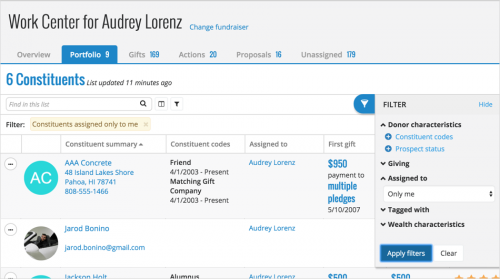 In Work Center, since the lists already include only items related to a particular fundraiser's assignments, you use the Assigned to filter to include records in context of any additional assignments:
- Only me — Records assigned to only the fundraiser whose Work Center you're viewing (and no one else!)
- Me and anyone else — Records assigned to the fundraiser, including those assigned to them and any other people
- Me and someone specific — Records assigned to the fundraiser, and those assigned to them and other people of your choice

- To view a list of constituents assigned to a specific fundraiser, use the Assigned to filter in Lists to choose the fundraiser, or view their Work Center and select the Portfolio list.
- To view a list of constituents assigned to only that fundraiser, view their Work Center and select "Only me" in the Assigned to filter for the Portfolio list.
- To view a list of constituents not assigned to anyone, open Work Center and select the Unassigned list.
0
Categories
- All Categories
- New YourCause Community TEST
- New SKY Community TEST
- New Grantmaking TEST Community
- New Altru Test Community
- New bbcon Community - TEST
- 12 Blackbaud Agents for Good™
- New Raiser's Edge NXT Community
- 7 Blackbaud Community Help
- 218 bbcon®
- 1.4K Blackbaud Altru®
- 409 Blackbaud Award Management™ and Blackbaud Stewardship Management™
- 1.2K Blackbaud CRM™ and Blackbaud Internet Solutions™
- 16 donorCentrics®
- 361 Blackbaud eTapestry®
- 2.7K Blackbaud Financial Edge NXT®
- 680 Blackbaud Grantmaking™
- 598 Blackbaud Education Management Solutions for Higher Education
- 3.3K Blackbaud Education Management Solutions for K-12 Schools
- 952 Blackbaud Luminate Online® and Blackbaud TeamRaiser®
- 85 JustGiving® from Blackbaud®
- 7K Blackbaud Raiser's Edge NXT®
- 3.9K SKY Developer
- 257 ResearchPoint™
- 123 Blackbaud Tuition Management™
- 165 Organizational Best Practices
- 247 Member Lounge (Just for Fun)
- 40 Blackbaud Community Challenges
- 37 PowerUp Challenges
- 3 (Closed) PowerUp Challenge: Grid View Batch
- 3 (Closed) PowerUp Challenge: Chat for Blackbaud AI
- 3 (Closed) PowerUp Challenge: Data Health
- 3 (Closed) Raiser's Edge NXT PowerUp Challenge: Product Update Briefing
- 3 (Closed) Raiser's Edge NXT PowerUp Challenge: Standard Reports+
- 3 (Closed) Raiser's Edge NXT PowerUp Challenge: Email Marketing
- 3 (Closed) Raiser's Edge NXT PowerUp Challenge: Gift Management
- 4 (Closed) Raiser's Edge NXT PowerUp Challenge: Event Management
- 3 (Closed) Raiser's Edge NXT PowerUp Challenge: Home Page
- 4 (Closed) Raiser's Edge NXT PowerUp Challenge: Standard Reports
- 4 (Closed) Raiser's Edge NXT PowerUp Challenge: Query
- 822 Community News
- 3.1K Jobs Board
- 57 Blackbaud SKY® Reporting Announcements
- 47 Blackbaud CRM Higher Ed Product Advisory Group (HE PAG)
- 19 Blackbaud CRM Product Advisory Group (BBCRM PAG)