This week,
Raiser's Edge NXT updates with a smattering of enhancements to how you analyze giving, track specialized constituent details, and — for admins — manage invitations.
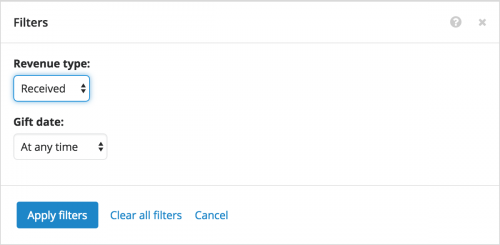 Analyze revenue received or committed. As previously discussed
, you can now choose —
by popular demand! — whether to analyze either cash-in-hand giving or commitments such as pledges or matching gifts. With the new
Revenue type filter, you can include gifts Received (for cash-in-hand) or Committed (for commitments) for metrics in
Fundraising,
Analyze and on records of campaigns, funds, and appeals. (In the future, your organization will be able to set up which gift types to count as received or committed revenue!) For more information, see the
Revenue Received or Committed Help.
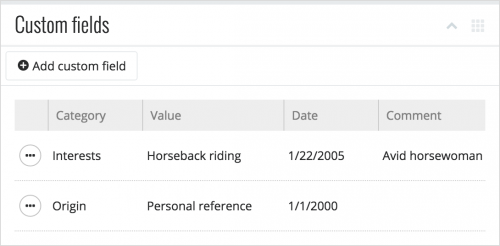 Manage a constituent's custom fields.
 On a constituent's record, you can now manage specialized information — such as their dietary preferences or interests — under
Custom fields. Previously, you could only view the details added as attributes in the database view. For more information, check out the
Custom Fields Help.
View when invitations expire. Admins! When you send invitations to
Raiser's Edge NXT, you can view whether their recipients responded in the
Users and
Awaiting response lists in
Control Panel,
Security. To detemine whether an invitation is still active, you can now view its expiration date in the
Status column of these lists. (Users have up to 30 days to accept invitations. If one expires, you can always send them another!) For more information, see the
Users and Invitations Help.
For more information about these features, or to catch up on previous releases, check out the
What's New Help and
What's Recent Help.
Enjoy!
