A Day In The Life Of An NXT Admin: Part 1



As an Administrator, you receive numerous requests each day, and all of those requests can likely be boiled down into three somewhat overlapping categories; Am I right? Things your users need help with, rights and access and things you have to set up. Raiser's Edge NXT may be just as new to you as it is to others on your team, so you may not even know where to start on some of those requests. Am I right again? Read on, and let me see if I can help. And don't worry, I won't tell anyone I told you.
Let's first look at the "Things your users need help understanding" category. Raiser's Edge NXT web view is still very much under development, and while we are adding new functionality to the web view on literally a weekly basis, your end users may still be unsure about where they should be doing the bulk of their work. We can start there. Raiser's Edge NXT is comprised of two "views" - the web view and the database diew. The web view is going to be a great place for: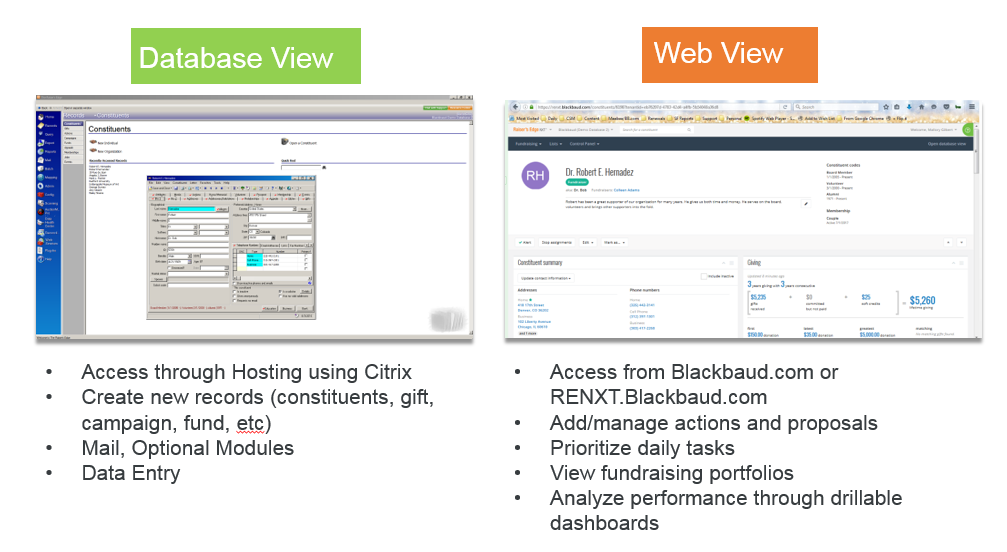
The last topic we will discuss in this category is functionality needs of your users - how to do something, what something means, what the dashboard is showing and what new functionality is available in the web view. The Help menu in Raiser's Edge NXT is one of the most value resources available to you. When you open the Help menu on any page (it's the little green question mark on the right hand side of your screen), it will display topics relevant to the page you're currently on. Pretty genius, huh? Not the right topic? You can search for any topic you'd like to see. Want to know what's been added recently? The Help menu will automatically display when there is new functionality, but you can bookmark this page so you can view new functionality at your leisure. Or you can open the Help menu and click the exclamation mark icon to see recently added functionality, as well as things we are currently working on.
Stay turned for the remaining two parts of this series!
Let's first look at the "Things your users need help understanding" category. Raiser's Edge NXT web view is still very much under development, and while we are adding new functionality to the web view on literally a weekly basis, your end users may still be unsure about where they should be doing the bulk of their work. We can start there. Raiser's Edge NXT is comprised of two "views" - the web view and the database diew. The web view is going to be a great place for:

- Fundraisers to manage their day-to-day priorities and actions (Work Center)
- Executives and managers to see performance at a glance (Analyze). Oh, and by the way, they can set up views they want to see often, schedule views to be emailed, drill into the data and so much more.
- To begin a query (Lists) if you want to leverage tags and analytics because you won't find that goodness in the database view. You can save lists in web view for later use or back into the database view as a static query or query list for further manipulation.
- Maintaining data health - you can update various fields (from your desk top or mobile device while you're out in the field) on the constituent record, which will ultimately help you keep your data clean and current.
The last topic we will discuss in this category is functionality needs of your users - how to do something, what something means, what the dashboard is showing and what new functionality is available in the web view. The Help menu in Raiser's Edge NXT is one of the most value resources available to you. When you open the Help menu on any page (it's the little green question mark on the right hand side of your screen), it will display topics relevant to the page you're currently on. Pretty genius, huh? Not the right topic? You can search for any topic you'd like to see. Want to know what's been added recently? The Help menu will automatically display when there is new functionality, but you can bookmark this page so you can view new functionality at your leisure. Or you can open the Help menu and click the exclamation mark icon to see recently added functionality, as well as things we are currently working on.
Stay turned for the remaining two parts of this series!
0
Categories
- All Categories
- New K-12 Community Home (TEST)
- New Higher Education Home Page (Test)
- New Impact Edge Community TEST
- New YourCause Community TEST
- New SKY Community TEST
- New Grantmaking TEST Community
- New Altru Test Community
- New bbcon Community - TEST
- 12 Blackbaud Agents for Good™
- New Raiser's Edge NXT Community
- 8 Blackbaud Community Help
- 222 bbcon®
- 1.4K Blackbaud Altru®
- 410 Blackbaud Award Management™ and Blackbaud Stewardship Management™
- 1.2K Blackbaud CRM™ and Blackbaud Internet Solutions™
- 16 donorCentrics®
- 361 Blackbaud eTapestry®
- 2.7K Blackbaud Financial Edge NXT®
- 687 Blackbaud Grantmaking™
- 603 Blackbaud Education Management Solutions for Higher Education
- 3.3K Blackbaud Education Management Solutions for K-12 Schools
- 954 Blackbaud Luminate Online® and Blackbaud TeamRaiser®
- 85 JustGiving® from Blackbaud®
- 7K Blackbaud Raiser's Edge NXT®
- 4K SKY Developer
- 258 ResearchPoint™
- 123 Blackbaud Tuition Management™
- 165 Organizational Best Practices
- 248 Member Lounge (Just for Fun)
- 40 Blackbaud Community Challenges
- 37 PowerUp Challenges
- 3 (Closed) PowerUp Challenge: Grid View Batch
- 3 (Closed) PowerUp Challenge: Chat for Blackbaud AI
- 3 (Closed) PowerUp Challenge: Data Health
- 3 (Closed) Raiser's Edge NXT PowerUp Challenge: Product Update Briefing
- 3 (Closed) Raiser's Edge NXT PowerUp Challenge: Standard Reports+
- 3 (Closed) Raiser's Edge NXT PowerUp Challenge: Email Marketing
- 3 (Closed) Raiser's Edge NXT PowerUp Challenge: Gift Management
- 4 (Closed) Raiser's Edge NXT PowerUp Challenge: Event Management
- 3 (Closed) Raiser's Edge NXT PowerUp Challenge: Home Page
- 4 (Closed) Raiser's Edge NXT PowerUp Challenge: Standard Reports
- 4 (Closed) Raiser's Edge NXT PowerUp Challenge: Query
- 829 Community News
- 3.1K Jobs Board
- 57 Blackbaud SKY® Reporting Announcements
- 47 Blackbaud CRM Higher Ed Product Advisory Group (HE PAG)
- 19 Blackbaud CRM Product Advisory Group (BBCRM PAG)