**Updating this blog post with a heads up on a
fairly recent discussion thread on this feature. How is your organization using the revenue type settings? Which gift types are you counting as received or committed revenue? Chime in on the thread to discuss!**
Recently,
Raiser's Edge NXT updated with a new
Revenue type filter, which you can use to choose whether to analyze giving in context of revenue cash-in-door or the total commitment to your fundraising efforts. Earlier today,
Raiser's Edge NXT released the next evolution: The ability for your organization to configure which types of gifts to consider when calculating both revenue received and committed!
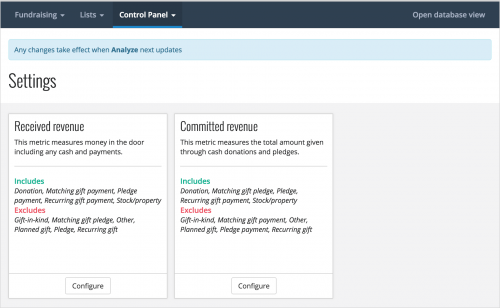
To set up these revenue types, admins can now select
Control Panel,
Settings and configure the global settings for each.
Received revenue. To focus on cash-in-hand giving, such as for accounting totals,
received revenue always includes donations and payments toward pledges, matching gifts, recurring gifts, and planned or legacy gifts. With the new settings, your organization can now choose whether to also include gifts-in-kind, stock/property, or gifts of Other.
To avoid double-counting, received revenue
doesn't include pledges, matching gifts, recurring gifts, planned gifts, or soft credits.
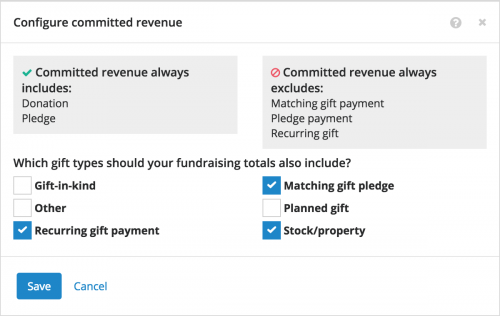 Committed revenue.
 To focus on the commitment toward your fundraising efforts,
committed revenue always includes donations and pledges. With the new settings, your organization can now choose whether to include:
- Recurring gift payments
- Matching gift pledges
- Planned or legacy gifts
- Gifts-in-kind
- Stock/property
- Gifts of Other
To avoid double-counting, committed revenue
doesn't include recurring gifts, soft credits, or payments toward pledges and matching gifts.
Any changes you make to these settings take effect when
Analyze next updates.
For more information, check out the
Revenue Types Help.