As you develop relationships with your donors and supporters, you're likely to build a wealth of records for constituents and related individuals and organization. To access someone's record, you can select their name, like in a list or under
Recently accessed in
Home. To find a specific record, you can also search for any individual or organization — constituent or relationship — with the
Search for a constituent field. It helps, though, to know what search criteria to use!
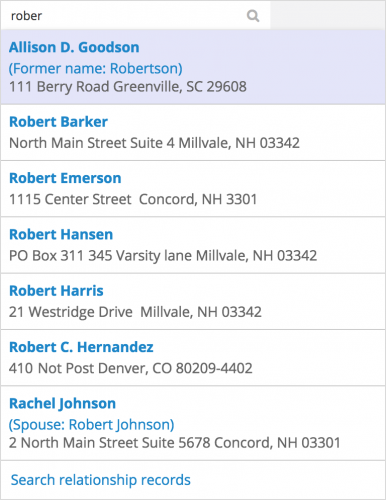
Like
Recently accessed in
Home, a list of who you recently accessed appears when you first select the
Search for a constituent field. To find someone else, think of the
Search for a constituent field as your
Google for
Raiser's Edge NXT. For the best results, use only specific search criteria to find a record:
- Their name — first and last, as well as preferred (or nickname, in the database view) or alias
- A constituent's lookup ID
- Their spouse's first or last name, if they're not also a constituent
- Their email addresses, except those marked as inactive
As you enter the search criteria, the top possible constituents appear, along with their contact and spousal information to help you identify the right record. For detailed search results, select
View all results or — if less than eight constituent matches —
Search relationship records. To help you distinguish who's who, the detailed search results include additional information, like profile pictures, any aliases or former names, and organizations for contacts. These results also include
any individual and organization —
not just constituents! — so you can find relationships like an organization's contact or an individual's employer directly.
With the
Search for a constituent field, you have all your constituents and related individuals and organizations at your fingertips. For more information, check out the
Search for Constituents Help.