This week,
Raiser's Edge NXT updates with several new features, including a new
Home page, enhancements to lists, and an update to tags!
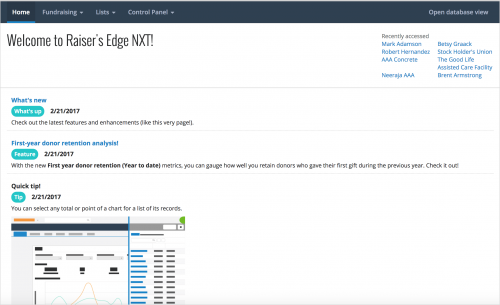 Stay in the know. As previously announced
, you can now select
Home for an interactive feed to stay current with everything
Raiser's Edge NXT and your active relationships. With the feed, you can quickly learn about new releases and training opportunities or familiarize yourself with the overall product and features. Under
Recently accessed, you can also quickly revisit constituent records. (If you don't have a
Work Center,
Home is now your new first stop when you sign into
Raiser's Edge NXT!)
Donor attrition tags now consider soft credits. As also previously discussed (on both the blog and
Home page!), the
At-risk donor,
Lapsing donor,
Lapsed donor, and
Lost donor tags now consider whether constituents receive soft credit for giving from others, such as a spouse or family foundation. (Previously, these tags only considered a donor's personal giving to your organization, as the
Donor lifecycle metrics in
Analyze still do.) For more information, see the
Donor Attrition Help.
 Locate constituents on a map (for everyone).
To locate nearby donors or help plan a trip, you can now select
Map on a constituent list. Powered by Microsoft
Bing, the map displays the locations of constituents — as pins — based on their primary addresses. To identify the constituent at a location, select its pin to view details such as their name and address. For more details, select the constituent's name to view their record. You can also search the map for a specific constituent or location, or select
Select map filter to include only constituents within a specific area. (Not new to you?
This feature released in waves, so you may've received it earlier than others.) For more information, check out the
Constituent Map Help.
 Share a saved list with others.
To share a list with someone at your organization, you can now simply save the list, select
Share and then
Copy, and paste its link into an email or message to the person. Unlike a hard-copy print-out of a list, the shared link ensures the recipient is always up-to-date with the latest records that meet the filter criteria. (A list may also include different records or details for different people, based on their security rights.) For more information, see the
Lists Help.
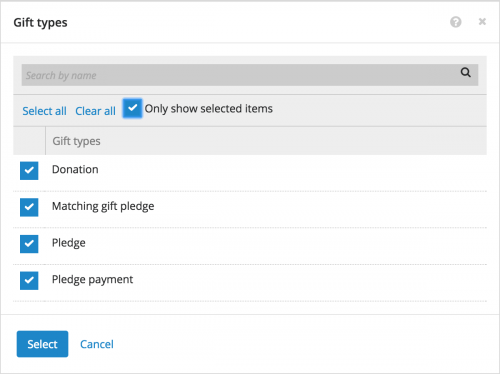 View the items selected for a list filter.
Some list filters — such as by campaign, constituent code, or fundraiser — offer many items to choose from. To view what you chose for a filter, such as to confirm you didn't miss anything, you can now select
Only show selected items when you select its criteria. For more information, see the
Lists Help.
For more information about these features, or to catch up on previous releases, check out the
What's New Help and
What's Recent Help.
Enjoy!
