As previously announced,
Raiser's Edge NXT recently released an exciting new feature — a constituent map! With this map, you can locate nearby constituents and plan interactions as you prepare for a trip; an ideal feature for the active fundraiser on-the-go!
Powered by Microsoft
Bing, the map displays the locations of constituents — as pins — based on their primary addresses. (When you update a constituent's primary address, it may take up to 24 hours for the new pin to appear on the map.) To adjust the area included in the map, select
Zoom in or
Zoom out (the plus and minus signs) as necessary.
- To identify the constituent at a location, select their pin to view their name and address. For more details, select the constituent's name to vew their record.
- When multiple constituents are in close proximity, the pin displays how many are near the location. To zoom in on the location and its constituents, select the pin.
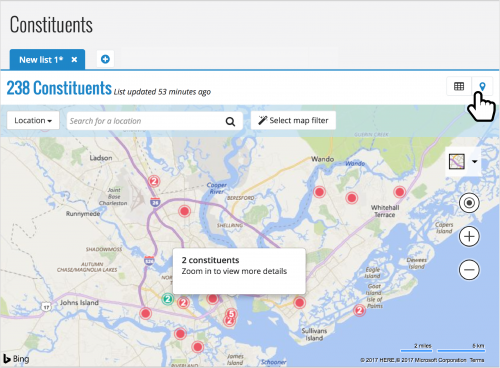 Locate nearby constituents.
 To view the map, select
Map (the pin) on a new constituent list. When you first open the map, it automatically displays constituents near you, based on the wifi or location settings of your device. You can also select
Locate me (the bullseye) to return the map's focus to your personal location at any time.
Search for other constituents. To locate constituents not in your general vicinity, search the map by constituent or location.
- To pinpoint a constituent, select Constituent next to the search box, enter their name, and select Search.
- To pinpoint a location like a specific city or part of town, select Location next to the search box, enter the address or general location, and select Search.
Filter constituents at a location. After you focus the map on a location (yours or elsewhere), you can narrow its pins to only those in a specific area. Simply select
Select map filter, and draw a box around the constituents to include! To view a list of those constituents, you can then select
List (the grid) to apply the map as a filter.
For more information about this feaure, check out the
Constituent Map Help. And don't hesitate to chime in with your thoughts and ideas about this feature in
the Discussions thread or the comments below!