This week,
Raiser's Edge NXT updates with enhancements to several features, including list filters, the constituent map, and
Applications.
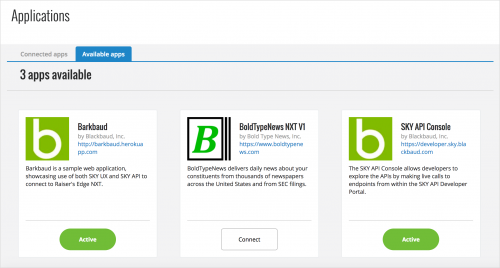 Quickly connect with new applications.
 To extend the functionality of
Raiser's Edge NXT, your organization can use additional applications created by Blackbaud or approved Blackbaud Partners. To easily connect with applications, admins can now find and add them directly from within
Control Panel,
Applications. Similar to Apple
App Store or Google
Play for your mobile device, you can browse and connect with applications under
Available apps. (Before you connect to apps from Blackbaud Partners, first contact the developer and set up a relationship with them. Only connect with apps you're famiiar with and authorize to access your data.) For more information, see the
Applications Help.
View the constituent map as a full page. To view the constituent map as a full page, such as on your mobile device, you can now select
Expand. (To return the map to its initial view, select
Compress.) For more information, check out the
Constituent Map Help.
Filter constituents by any or all constituent codes or assigned fundraisers. When you filter a list of constituents by multiple constituent codes or assigned fundraisers, you can now choose whether to include those who have
any — such as Volunteer
or Vendor, John
or Ringo — or
all — Volunteer
and Vendor, John
and Ringo — of the selected criteria. For more information, see the
Constituent List Filters Help.
Lifetime giving now considers soft credited pledge balances. To avoid double-counting, a constituent's
lifetime giving estimate now includes the outstanding balances of soft credited pledges in addition to soft credited pledge payments. (Previously, this estimate included the full amount of the soft credited pledge.) For more information, see the
Constituent Giving Help.
For more information about these features, or to catch up on previous releases, check out the
What's New Help and
What's Recent Help.
Enjoy!
