To help manage and track email interactions, you can now
install the new Raiser's Edge NXT for Outlook add-in to view constituent information and add actions directly in Microsoft
Outlook!
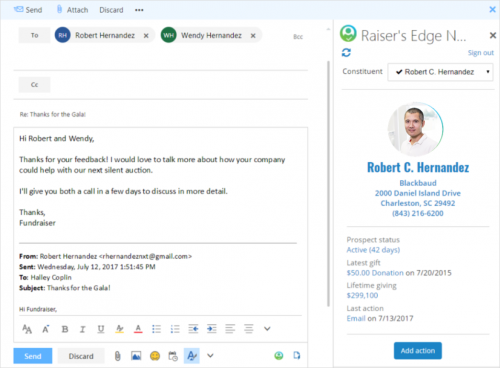
From an email message in
Outlook, you can:
- Quickly review details from the constituent record of a sender or recipient, including their name, contact information, and recent giving.
- Automatically add the email interaction as an action on the constituent's record, complete with what was said and when.
Admins! To enable others at your organization to install the add-in, first connect it in
Control Panel,
Applications. Under
Available apps, browse to
Raiser's Edge NXT for Outlook and select
Connect. Once enabled, people at your organization can then install the application through the
Microsoft Office Store.
For more information, see the
Raiser's Edge NXT for Outlook Help.
To catch up on previous releases, see the
What's Recent Help.
Enjoy!