To include only specific gifts in a list, you can select
Filters (the funnel) and choose the criteria of the giving to include. To help narrow the focus,
Raiser's Edge NXT recently introduced additional gift list filters.
 Gift constituency.
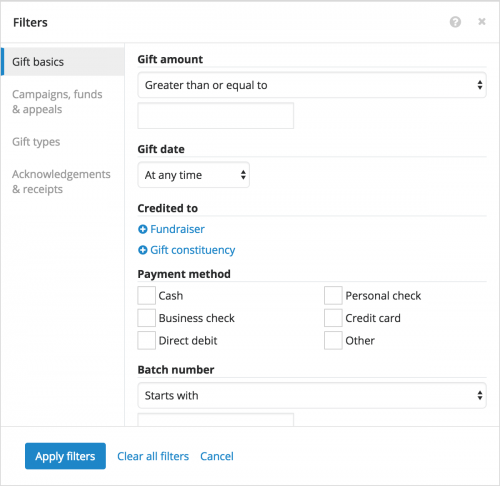
On a gift's record, you can track the donor's constituent code — or their affiliation with your organization — in context of the gift. To filter gifts based on this information, select
Gift basics and then, under
Credited to, select
Gift consituency, choose the constituent codes to include, and select
Select.
Payment method. Donors may pay for gifts through various means, like cash, check, or credit card. To filter gifts based how the donor paid for them, select
Gift basics and then, under
Payment methods, choose the methods to include.
Batch number. In the database view, you can add multiple gifts at once as a batch. To filter gifts based on their batches, select
Gift basics and then, under
Batch number, choose the batches to include, such as 'Starts with EV3'.
Acknowledgement. To thank a donor for their gift, you should send an acknowledgement letter to recognize their generosity. To filter gifts based on their acknowledgement, select
Acknowledgements & receipts and then, under
Acknowledgements, choose the criteria of the gifts to include:
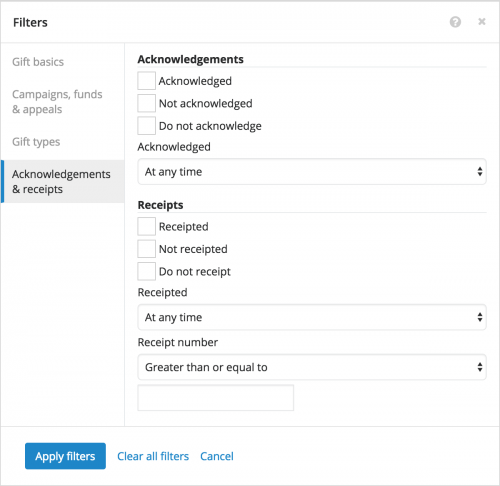 Whether they are — or will be — acknowledged
- When your organization sent their donors an acknowledgement letter
Receipt. To help a donor track their charitable giving for tax purposes, you should provide them a receipt for their gift. To filter gifts based on their receipt, select
Acknowledgements & receipts and then, under
Receipts, choose the criteria of the gifts to include:
- Whether they are — or will be — receipted
- When your organization issue their donors a receipt
- Those issued a receipt with a specific number or within a specific range of numbers
For more information, check out the
Gift List Filters Help.
