This week,
Raiser's Edge NXT updates with new constituent filters and opportunity details.
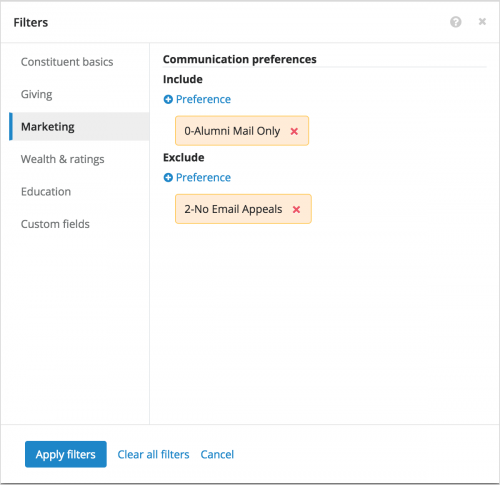 View and filter by communication preferences in constituent lists.
Communication preferences are a constituent's specific rules of contact, such as 'Do not mail' or 'Solicit once annually'. (In the database view, these appear as
solicit codes.)
To view the active preferences of constituents in a list, you can include the new
Communication preferences column. To include this column, select
Choose columns,
Communication preferences, and
Apply changes.
To include or exclude constituents based on their active communication preferences, such as for a mailing list, select
Filters and
Marketing, choose the preferences to filter by, and select
Apply filters.
- To include only constituents with specific preferences, select Preference under Include, choose which to filter by, and select Select.
- To remove constituents with specific preferences from the list, select Preference under Exclude, choose which to filter by, and select Select.
For more information, see the
Constituent List and Map Filters Help.
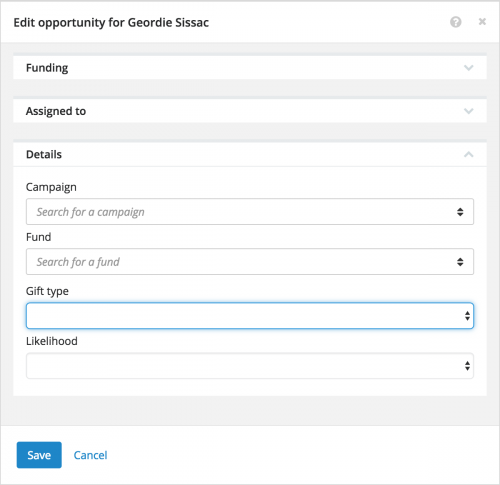 Identify how — and how likely — you are to receive giving from opportunities.
With
Prospect Research Management, you can use opportunities to plan and track efforts to build relationships with prospects and secure major gifts. To help identify how — and how likely — you are to receive giving from these efforts, you can now view and edit the
Gift type and
Likelihood fields under
Details on an opportunity's record.
- In the Gift type field, track how you expect to receive giving that results from the opportunity, such as a recurring gift or gifts-in-kind.
- In the Likelihood field, track how confident you are that giving will result from the opportunity. (In the database view, this appears as the proposal's rating.)
For more information, see the
Opportunity Details Help.
For more information about these features, or to catch up on previous releases, check out the
What's New Help and
What's Recent Help.
Enjoy!
