This week,
Raiser's Edge NXT updates with enhancements to help filter constituents and track custom ratings.
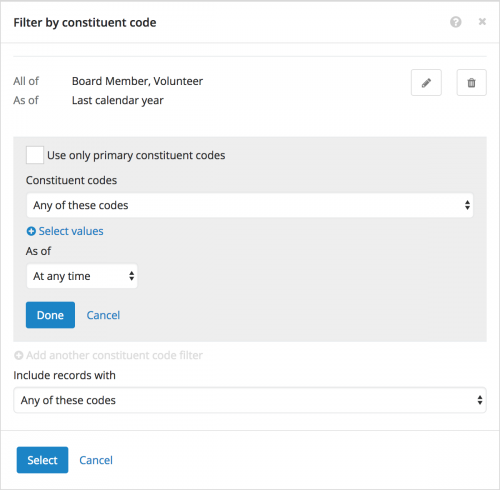 Filter constituent lists based on constituent code start and end dates.
 To help include constituents in a list based on their affiliation with your organization, such a Board member, Vender, or Volunteer, you can now choose start and end dates when you filter by constituent code. You can also apply multiple constituent code filters — such as from different time periods — and choose whether to use only primary constituent codes for each. To filter a constituent list by constituent code, select
Filters (the funnel),
Constituent basics, and then select
Constituent code under
Donor characteristics. For more information, see
Constituent Basics Filters.
Manage older custom ratings for a constituent. With custom ratings, your organization can track wealth information about your constituents, gathered from your own research or other sources like
ResearchPoint, Marts & Lundy, or econometrics. On a constituent's record, you can now edit and delete previous instances of custom rating types. (Previously, you could only manage the most recent instance.) Under
Ratings, select
Edit ratings from the custom rating's menu, and then select
Edit (the pencil) for the instance to update or delete. For more information, see the
Custom Ratings Help.
For more information about these features, or to catch up on previous releases, see the
What's New Help and
What's Recent Help.
Enjoy!