What's New In Raiser's Edge NXT The Week Of November 14
This week, Raiser's Edge NXT introduces a variety of new features and enhancements, including to the Location filter, duplicate search, Outlook add-in, and... oh yeah, Export!
Export a list as a CSV file! By popular demand (and as previously discussed), you can now download a list in Lists or Fundraising, Work as a comma-separated values (CSV) file, such as for analysis or offline reference in Microsoft Excel or Google Sheets. To download a list as a CSV file, select Export and then — when the export completes — Download file. (Keep in mind that a CSV file is simply a snaphot of a single moment in time. For the current and most accurate information, refer to the list directly in Raiser's Edge NXT on your desktop or mobile device!) For more information, check out the Lists Help.
Admins! In Control Panel, choose who can export from Lists or Fundraising, Work. To help protect and control your constituents' personal data, we recommend only the appropriate people at your organization be able to export from Raiser's Edge NXT. For more information, see the List Rights Help and Fundraising Work Center Rights Help.
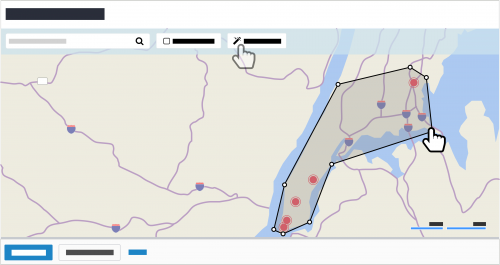
View constituents as pins with the Location filter. To help identify areas to include when you filter a list by location, you can now view constituents as pins on the map, based on their primary addresses. To filter a constituent list by location, select Filters, Location, Filter using map view, and then specify where to include as a rectangle or custom area. For more information, see the Constituent List Filters Help.
Connect to multiple databases in Raiser's Edge NXT for Outlook. To help manage interactions with your constituents, you can now connect to and switch between multiple databases with the Raiser's Edge NXT for Outlook add-in. To connect to a new database, select Add next to the connected database, sign in with your Blackbaud ID, choose the database to use, and select Authorize. For more information, see the Raiser's Edge NXT for Outlook Help.
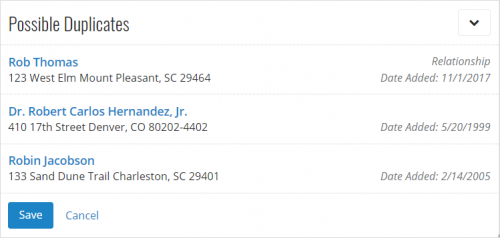
View possible duplicates based on relationship records and all addresses. To help more easily identify potential duplicates when you add individuals and organizations, relationship records under Possible duplicates now appear with Relationship. Additionally, possible duplicates now include matches for all addresses, not just those marked as Primary. For more information, see the Duplicate Records Help.
For more information about these features, or to catch up on previous releases, see the What's New Help and What's Recent Help. Enjoy!

Export a list as a CSV file! By popular demand (and as previously discussed), you can now download a list in Lists or Fundraising, Work as a comma-separated values (CSV) file, such as for analysis or offline reference in Microsoft Excel or Google Sheets. To download a list as a CSV file, select Export and then — when the export completes — Download file. (Keep in mind that a CSV file is simply a snaphot of a single moment in time. For the current and most accurate information, refer to the list directly in Raiser's Edge NXT on your desktop or mobile device!) For more information, check out the Lists Help.Admins! In Control Panel, choose who can export from Lists or Fundraising, Work. To help protect and control your constituents' personal data, we recommend only the appropriate people at your organization be able to export from Raiser's Edge NXT. For more information, see the List Rights Help and Fundraising Work Center Rights Help.
View constituents as pins with the Location filter. To help identify areas to include when you filter a list by location, you can now view constituents as pins on the map, based on their primary addresses. To filter a constituent list by location, select Filters, Location, Filter using map view, and then specify where to include as a rectangle or custom area. For more information, see the Constituent List Filters Help.Connect to multiple databases in Raiser's Edge NXT for Outlook. To help manage interactions with your constituents, you can now connect to and switch between multiple databases with the Raiser's Edge NXT for Outlook add-in. To connect to a new database, select Add next to the connected database, sign in with your Blackbaud ID, choose the database to use, and select Authorize. For more information, see the Raiser's Edge NXT for Outlook Help.
View possible duplicates based on relationship records and all addresses. To help more easily identify potential duplicates when you add individuals and organizations, relationship records under Possible duplicates now appear with Relationship. Additionally, possible duplicates now include matches for all addresses, not just those marked as Primary. For more information, see the Duplicate Records Help.For more information about these features, or to catch up on previous releases, see the What's New Help and What's Recent Help. Enjoy!

1
Comments
-
Hi Steve
Great blog! It's really useful to keep up to date on what's being released on RENXT.
Quick question: Is there a Duplicate Record Management Tool in RENXT, and if so, where is it?
-Andrew0 -
Hey Andrew! Glad to hear you find the blog and What's New posts helpful! As mentioned above, you can identify possible duplicates when you add individuals and organizations — both constituents and relationships — in the web view, based on the name and contact information entered for the new record. As for a duplicate management/merge tool, there isn't such a feature in the web view (yet, but stay tuned). In the meantime, you can find a similar tool under Admin in the database view. Thanks again!0
Categories
- All Categories
- 6 Blackbaud Community Help
- 206 bbcon®
- 1.4K Blackbaud Altru®
- 394 Blackbaud Award Management™ and Blackbaud Stewardship Management™
- 1.1K Blackbaud CRM™ and Blackbaud Internet Solutions™
- 15 donorCentrics®
- 357 Blackbaud eTapestry®
- 2.5K Blackbaud Financial Edge NXT®
- 646 Blackbaud Grantmaking™
- 561 Blackbaud Education Management Solutions for Higher Education
- 3.2K Blackbaud Education Management Solutions for K-12 Schools
- 934 Blackbaud Luminate Online® and Blackbaud TeamRaiser®
- 84 JustGiving® from Blackbaud®
- 6.4K Blackbaud Raiser's Edge NXT®
- 3.6K SKY Developer
- 242 ResearchPoint™
- 118 Blackbaud Tuition Management™
- 165 Organizational Best Practices
- 238 The Tap (Just for Fun)
- 33 Blackbaud Community Challenges
- 28 PowerUp Challenges
- 3 (Open) Raiser's Edge NXT PowerUp Challenge: Product Update Briefing
- 3 (Closed) Raiser's Edge NXT PowerUp Challenge: Standard Reports+
- 3 (Closed) Raiser's Edge NXT PowerUp Challenge: Email Marketing
- 3 (Closed) Raiser's Edge NXT PowerUp Challenge: Gift Management
- 4 (Closed) Raiser's Edge NXT PowerUp Challenge: Event Management
- 3 (Closed) Raiser's Edge NXT PowerUp Challenge: Home Page
- 4 (Closed) Raiser's Edge NXT PowerUp Challenge: Standard Reports
- 4 (Closed) Raiser's Edge NXT PowerUp Challenge: Query
- 778 Community News
- 2.9K Jobs Board
- 53 Blackbaud SKY® Reporting Announcements
- 47 Blackbaud CRM Higher Ed Product Advisory Group (HE PAG)
- 19 Blackbaud CRM Product Advisory Group (BBCRM PAG)

