This week,
Raiser's Edge NXT updates with a couple nifty enhancements to lists.
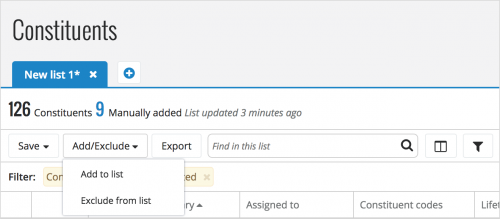 Add or exclude specific constituents in lists.
To fine-tune a list, you can now add or exclude specific constituents or lists of constituents, such as based on your relationship with them or the intent of your list. For example, you may add a seed list to a mailing as a quality check, or exclude recent appeal recipients from another communication to help prevent donor fatigue. To add or exclude records in a constituent list, select
Add/Exclude and
Add to list or
Exclude from list, and then choose the records or lists to add or exclude.
Avoid overwriting someone else's changes to a saved list. Multiple people can work in the same list at the same time. If your changes conflict with someone else's, you can now choose whether to save a new list, overwrite the other person's changes, or discard yours. You can also cancel the save to temporarily keep your changes without truly affecting the list.
For more information about these features, see the
What's New Help and
Lists Help. To catch up on previous releases, check out the
What's Recent Help.
Enjoy!