This week,
Raiser's Edge NXT updates with nifty enhancements to lists and actions.
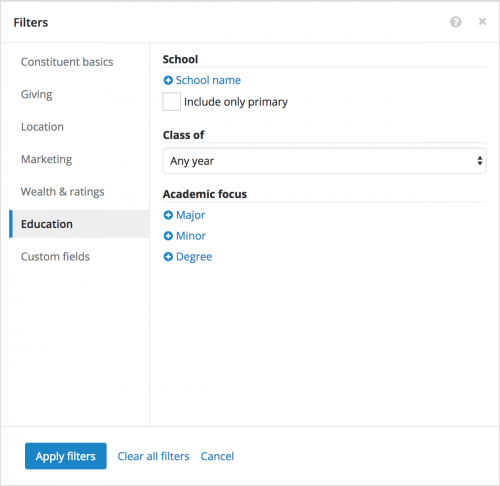 Filter constituent lists by academic degree.
To include constituents in a list based on their academic qualifications such as Bachelor of Arts (BA) or Doctor of Philosophy (Ph.D.), you can now filter by degree. To use this filter, select
Filters,
Education, and then — under
Academic focus — select
Degree, choose the levels of education to include, and select
Select. For more information, see the
Constituent Education Filters Help.
Open records in Raiser's Edge NXT from an exported list. As previously discussed, you can now open a record in
Raiser's Edge NXT from an exported list, such as in Microsoft
Excel or Google
Sheets. In the spreadsheet created from the exported comma-separated values (CSV) file, select
Open in NXT in the new
View record column for the record to open. For more information, see the
Lists Help.
Add calendar appointments for past actions. To help track the interactions and task necessary to cultivate relationships with constituents, you can now —
by popular demand! — create calendar appointments for actions that already occurred but weren't originally added to your calendar. (Previously, you could only add upcoming actions to your calendar.)
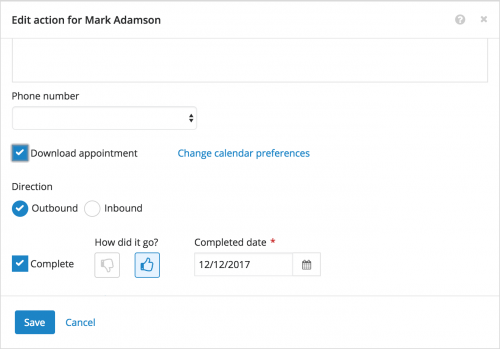
Under
Notes and actions on the constituent's record, select
Add action for a new action or
Edit action from an existing action's menu, and then enter or update its details, and select
Add to calendar or
Download appointment. For more information, see the
Calendar Appointments Help.
For more information about these features, or to catch up on previous releases, see the
What's New Help or
What's Recent Help.
Enjoy!
