Whether it's to comply with regulatory guidelines — like the EU's
General Data Protection Regulation (GDPR) — or simply build positive relationships, it's important to ask constituents which types of communications they want to receive and how. This week,
Raiser's Edge NXT updates with features to help you track and honor how a constituent requests to communicate with your organization.
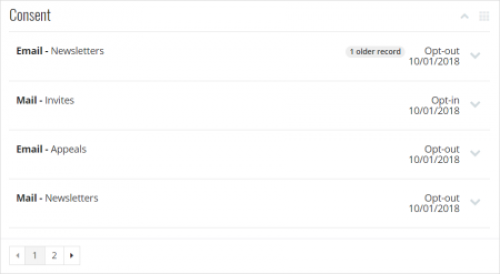 View a constituent's consent history.
To verify a constituent's preferences for communications, you can now view a history of their consent responses — including which types of communications and channels they opt in or out of — under
Consent on their record.
With applications such as
Blackbaud NetCommunity or
Online Express, you can collect consent from forms on your website and download those responses in the database view. In the database view, you can also add and manage a constituent's consent responses on the
Bio 1 tab of their record, such as when you receive consent over the phone or via a reply card.
For more information, see the
Consent Help.
Secure changes to communication preferences. On a constituent's record, you can track their general rules of contact — such as to not call after 8:00 p.m or on weekends — under
Communication preferences. To help manage rights to edit these preferences in the web view, admins can now control access to them — as
solict codes — from
Admin,
Security in the database view. For more information, see the
Communication Preferences Help.
For more information about these features, or to catch up on previous releases, check out the
What's New Help or
What's Recent Help.
Enjoy!
