Webview Tools To Make Your Day Easier
Work smarter not harder they say. While that may seem difficult at times, these webview areas in RE NXT are meant to help you and your colleagues work more efficiently. Check out these functional areas to see how you can incorporate them into your regular workflow.
Fundraising > Analyze
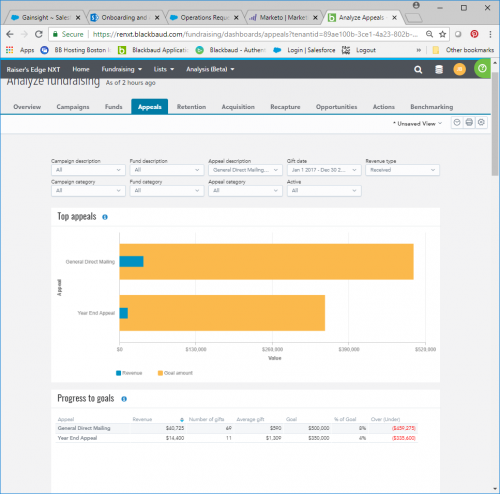
Building on industry best practices, Blackbaud created ready-made dashboards comprised of key metrics that allow you to quickly assess your organization's overall fundraising efforts. Analyze areas such as Recapture or Retention provide easier drill down to specific constituent groups for which you might want to take action. Navigate to Fundraising > Analyze and you have various graphs displaying how well your organization acquires donors and gifts, completes actions and opportunities, raises money toward funds and appeals. Use this analysis to drive action and inform your next steps.
Drill down directly from the Analyze dashboard report – with the click of a button, a single number can be broken into the list of donor names contributing to that figure. For further analysis, select Create list to open the list in Lists, where you can apply additional filters, choose columns, and save for follow up.
Bonus: setup a dashboard with appropriate filters and RE NXT can automatically email the view to staff based on a schedule you set, just look for the little clock next to the name of view.
Portfolio management in Work Center
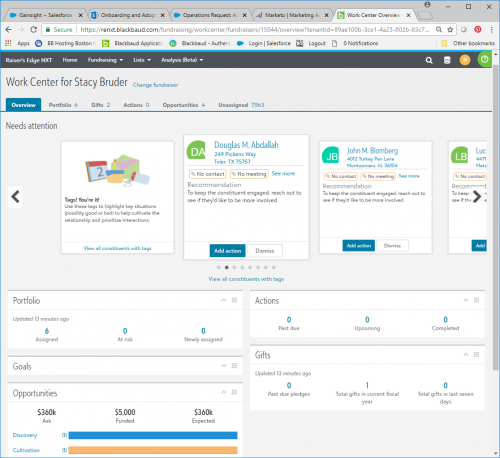
Located in Fundraising > Work Center, this is the area to track steps to cultivate relationships and secure gift opportunities for your assigned constituents. This tool allows fundraisers to easily view and track assigned records and tasks necessary to manage a portfolio. To set up Work Center for a staff member, a system administrator can simply:

Fundraising > Analyze
Building on industry best practices, Blackbaud created ready-made dashboards comprised of key metrics that allow you to quickly assess your organization's overall fundraising efforts. Analyze areas such as Recapture or Retention provide easier drill down to specific constituent groups for which you might want to take action. Navigate to Fundraising > Analyze and you have various graphs displaying how well your organization acquires donors and gifts, completes actions and opportunities, raises money toward funds and appeals. Use this analysis to drive action and inform your next steps.
Drill down directly from the Analyze dashboard report – with the click of a button, a single number can be broken into the list of donor names contributing to that figure. For further analysis, select Create list to open the list in Lists, where you can apply additional filters, choose columns, and save for follow up.
Bonus: setup a dashboard with appropriate filters and RE NXT can automatically email the view to staff based on a schedule you set, just look for the little clock next to the name of view.

Portfolio management in Work Center
Located in Fundraising > Work Center, this is the area to track steps to cultivate relationships and secure gift opportunities for your assigned constituents. This tool allows fundraisers to easily view and track assigned records and tasks necessary to manage a portfolio. To set up Work Center for a staff member, a system administrator can simply:
- Link staff to constituent records and mark them as fundraisers in database view
- Assign fundraisers to a security group with rights to Work Center
- Assign fundraisers to constituent relationships
- Begin assigning fundraisers to actions, opportunities, and gifts

0
Categories
- All Categories
- 6 Blackbaud Community Help
- 210 bbcon®
- 1.4K Blackbaud Altru®
- 395 Blackbaud Award Management™ and Blackbaud Stewardship Management™
- 1.1K Blackbaud CRM™ and Blackbaud Internet Solutions™
- 15 donorCentrics®
- 360 Blackbaud eTapestry®
- 2.5K Blackbaud Financial Edge NXT®
- 649 Blackbaud Grantmaking™
- 567 Blackbaud Education Management Solutions for Higher Education
- 3.2K Blackbaud Education Management Solutions for K-12 Schools
- 937 Blackbaud Luminate Online® and Blackbaud TeamRaiser®
- 84 JustGiving® from Blackbaud®
- 6.5K Blackbaud Raiser's Edge NXT®
- 3.7K SKY Developer
- 247 ResearchPoint™
- 119 Blackbaud Tuition Management™
- 165 Organizational Best Practices
- 239 The Tap (Just for Fun)
- 33 Blackbaud Community Challenges
- 31 PowerUp Challenges
- 3 (Open) PowerUp Challenge: Data Health
- 3 (Closed) Raiser's Edge NXT PowerUp Challenge: Product Update Briefing
- 3 (Closed) Raiser's Edge NXT PowerUp Challenge: Standard Reports+
- 3 (Closed) Raiser's Edge NXT PowerUp Challenge: Email Marketing
- 3 (Closed) Raiser's Edge NXT PowerUp Challenge: Gift Management
- 4 (Closed) Raiser's Edge NXT PowerUp Challenge: Event Management
- 3 (Closed) Raiser's Edge NXT PowerUp Challenge: Home Page
- 4 (Closed) Raiser's Edge NXT PowerUp Challenge: Standard Reports
- 4 (Closed) Raiser's Edge NXT PowerUp Challenge: Query
- 784 Community News
- 2.9K Jobs Board
- 53 Blackbaud SKY® Reporting Announcements
- 47 Blackbaud CRM Higher Ed Product Advisory Group (HE PAG)
- 19 Blackbaud CRM Product Advisory Group (BBCRM PAG)