Whether to comply with regulatory guidelines or simply build positive relationships, it's important to ask constituents with communications they want to receive and then honor their preferences. This week,
Raiser's Edge NXT updates with enhancements to help ease tracking your constituents' consent for communications.
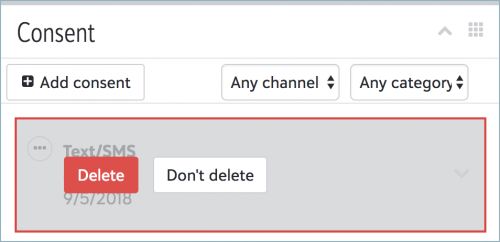 Delete consent records.
 If consent is added incorrectly or to the wrong constituent, admins can now delete the consent record under
Consent on the constituent record. To delete a consent record, select
Delete from the menu of its channel or category, and then select
Delete. (To delete an older response from the consent history, select
older records for the channel or category first.) For more information, see the
Consent Help.
Automatically track email consent. If your organization has
Marketing,
Email, communications you send automatically include a link that recipients can select to unsubscribe or opt back into future messages. To help manage consent, when a constituent selects this link, their record now automatically includes their response under
Consent. (If you don't have
Email yet, don't worry. If all goes well based on feedback and usage, expect its wider release in a future update.) For more information, see the
Email Consent Help.
Admins! In the database view, you can set up business rules from
Configuration,
Business Rules,
Consent options to automatically update communication preferences based on a constituent's consent response. For more information, see
Configure Consent Business Rules.
For more information on these features, or to catch up on previous releases, check out the
What's New Help and
What's Recent Help.
Enjoy!
