For flexibility in how you analyze and share data,
some of you can now design custom dashboards in
Analysis,
Report builder.
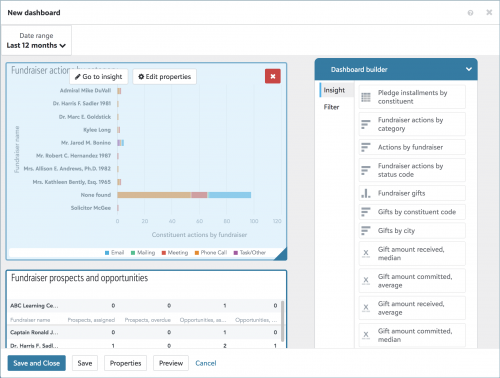
When you design your dashboard, you choose from — and drag-and-drop — several out-of-the-box insights about
constituents,
gifts,
actions, and
opportunities. To help customize the analysis as you add it to a dashboard, you can:
- Apply filters to specific insights or the overall dashboard.
- Choose which of its measures — such as amounts or totals — to view.
- Override its default attributes or criteria, such as to analyze giving by funds instead of campaigns.
If your organization needs additional flexibility, you can choose to use
Insight Designer to design custom insights. When you design insights, you can:
- Choose from different chart types — such as tables, bar and column charts, or scatter plots — to best convey your data and ease analysis.
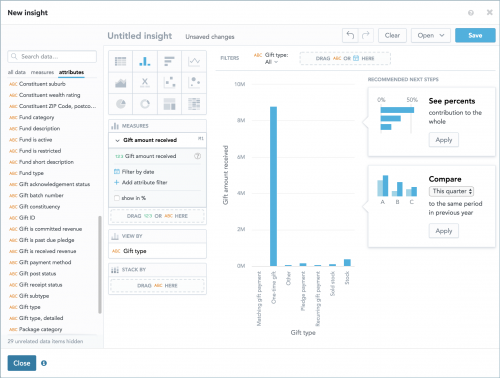 Pair measures about constituents, giving, actions, or opportunities with related attributes — via drag-and-drop — to analyze amounts or totals based on specific criteria. (To get started with common custom giving insights, check out the Gift Insight Recipes Help.)
- Apply filters to measures to help narrow their focus to specific records.
With a dashboard's flexible formatting options, you can:
- Place out-of-the-box and custom insights side-by-side and adjust their layout.
- Edit an insight's measures or attributes directly from the dashboard.
- Share dashboards with other at your organization.
In
Fundraising,
Reporting, you can now view these shared custom dashboards with the same pre-configured dashboards — such as
Campaigns and
Retention — you used in
Fundraising,
Analyze. To streamline your experience, you can choose which pre-configured dashboards to view. For more information, see the
Report Builder Help.
Admins! In
Control Panel,
Security, you can choose which roles can access
Analysis,
Report builder or
Fundraising,
Analyze. For those with access to
Fundraising,
Analyze, you can also choose which pre-configured dashboards they can use. For more information, see the
Report Builder Rights Help and
Analyze or Reporting Rights Help.