This week,
Raiser's Edge NXT begins the waved roll out of
Workflow designer. Also, for some clients who also have
Luminate Online, the roll out of
Social posting and role-based security continue.
Create workflows to automate everyday activities (for some of you). Similar to action tracks in the database view, you can now use
Workflow designer to automate a series of actions — such as meetings, phone calls, and other tasks — and assign them to a fundraiser to complete, saving you precious time each day.
You can apply a workflow to a single constituent or a list of constituents that meet specific criteria. To get started, select
Tools,
Workflow designer! For more information, see
Workflow Designer.
Create and schedule online posts with role-based security (for some of you who also have Luminate Online). 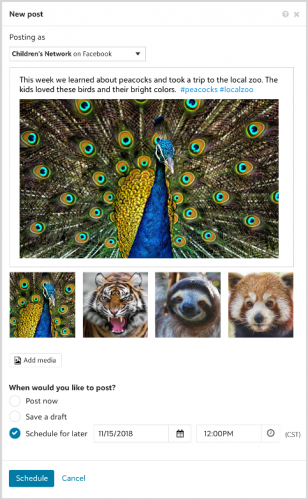
With
Social posting, you can engage with your supporters on
Facebook and
Twitter from a central location in
Raiser's Edge NXT or
Luminate Beta.From
Marketing,
Social, you can:
- Create the content of your posts
- Add images (up to four per post!)
- Post immediately to your social media accounts or schedule it for later
- Keep track of all previous posts.
For more information, see
Social Posting.
Admins! You can now invite users and manage their access to web view features — like the new
Marketing,
Social — based on the tasks and permissions of their
roles. Under
Roles in
Control Panel,
Security, your users' former security groups with rights set for web view features now appear as roles under
Fundraising roles. Most security groups now appear as identical roles, with the group's rights now its corresponding permissions. (For more nuanced users, security groups may combine into a single role to capture rights that don't align with the tasks and permissions of other roles created from security groups. For more information, see the
Security Groups or Roles? Help.) Under
Fundraising roles, you can manage roles' tasks and permissions for web view features.
- For Marketing, Social, see the Marketing Security Help.
- For Fundraising, Work, see the Fundraising Work Center Rights Help.
- For Fundraising, Analyze, see the Analyze Rights Help.
- For Lists, see the List Rights Help.
- For attachments on records of campaigns, funds, and appeals, see the Attachment Rights Help.
For more information, see the
Role-based Security Overview Help.
Role-based security for multiple Blackbaud solutions (for the same some of you who also have Luminate Online).
Admins! In
Control Panel,
Security, you can now invite users and manage their security based on roles for a specific Blackbaud solution. This provides a flexible way to assign security to a user by granting access to one solution while preventing access to another. For example, you can make a user an admin for
Luminate Beta and prevent access to
Raiser's Edge NXT so they don't have rights to view sensitive donor information. For more information, see
Users.
Don't see these features? No worries, if all goes well based on feedback and usage, expect its wider release in future updates.
For more information about these features, or to catch up on previous releases, check out the
What's New Help and
What's Recent Help.
Enjoy!