My Community
YourCause®
Impact Edge™
All-Star Lounge
Member Lounge (Just for Fun)
Community News
Community Manager
Groups
Browse Categories
Members
Community All-Stars
Monthly Challenges
Member Search
Jobs Board
Help
Using the Blackbaud Community
Blackbaud Support
Knowledgebase
Blackbaud University
Discussions
Categories
Groups
Home
Blackbaud Raiser's Edge NXT®
Raiser's Edge NXT Blog
Email Improvements
Kimberly Coughlin
Have you used the new designer for
Email
in
Raiser’s Edge NXT
? I find it’s less sluggish than the previous version and easier to use when I need to position content in a message.
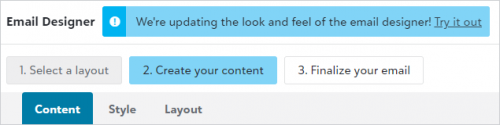
If you’re hesitant to switch, you have one more week to preview the changes before we upgrade everyone to use it. From
Marketing, Email
, select
Try it out
under
Create your content
in the current email designer.
What if I want to check it out, but don’t have time to learn the features before I send my next email?
Until next week, you can return to the previous view after you select to try the new functionality. To revert back, select
Return to classic look
from the new designer.
What if I have drafts or scheduled messages I created in the previous version? What happens when my account upgrades?
Your messages will automatically convert to use the new designer. There’s no additional work for you.
What if I copy a message I created in the previous version?
It will automatically work in in the new designer. There’s no additional work for you.
I don’t have a problem with the current designer, why should I switch?
In addition to how efficiently you can view changes and precisely style messages, we added the new designer to promote a consistent experience across other areas of the application.
What else is in it for me?
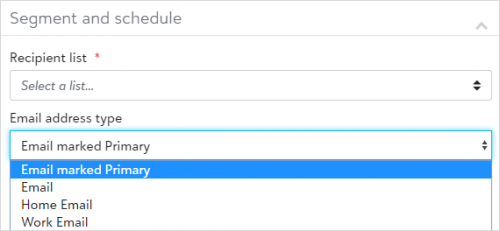
Drumroll please. When we upgrade everyone next week, we’re also introducing a new field for you to choose which of your recipients’ inboxes to send messages to.
To target a specific email address, you’ll be able to select it from a new
Email address type
field under
Finalize your email
in the email designer.
If you have additional questions, please contact Support, your Customer Success Manager, or post a question in the in comments section.
Find more posts tagged with
Comments
Angie O'Neill
I've just been using Rasier's Edge to create my emails in Online Express. Will those go away? Can I still use them? Will they convert to NXT?
Michele Stender
Hi
Angie ONeill
You can continue to use Online Express with no concerns of it going away anytime soon. Your emails in Online Express will not convert to OLX but you should notice that it is a similar drag and drop functionality that you are used to in Online Express. The email functionality in RENXT was built to continue to bring more and more value to RENXT. It is also where you will start to see more and more new functionality being built. I hope this helps answer your questions!
Quick Links
All Categories
Recent Posts
Activity
Unanswered
Groups
Help
Best Of