What's New In Raiser's Edge NXT The Week Of March 19
Kimberly Coughlin
Blackbaud Employee
This week, Raiser's Edge NXT introduces several features such as enhanced security for wealth and ratings details and improvements in Email. Secure wealth and ratings details in constituent lists. In a constituent list, you can use Wealth & ratings filters to include records based on your organization's custom ratings or wealth ratings, ask amounts, and suggested donor types from Target Analytics. To help protect this constituent information, admins can now secure access to these filters and the related Rating columns.
Note: If you currently have a saved list that uses the Wealth & ratings filters but don't have the proper security, you'll encounter a permission error when you open that list.
Admins! In the database view, you can secure access to the Wealth & ratings filters and Rating columns. To enable someone to use these features, grant their security group at least View rights for the Ratings permission under Constituent Privileges in Admin, Security. For more information, see Wealth and Ratings Filters.
Link a user account to a constituent record.
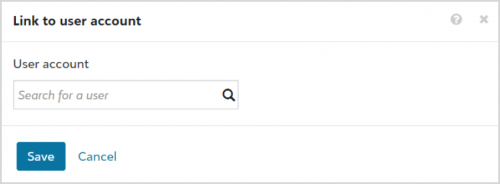
To enable a fundraiser, staff member, or volunteer to use Raiser's Edge NXT, you link their constituent record to their user account. On a constituent record, you can now view and manage the linked user account under Constituent summary. To link a constituent record to a user account, under Constituent summary select Edit, User account, search for the user's Raiser's Edge NXT account, and select Save.
If a constituent is already linked to a user account and you mark that record as a Fundraiser, you no longer have to manually search for the user account. Instead, marking the constituent as a Fundraiser automatically selects the linked user. For more information, see User Account.
For some of you:
Design email more efficiently and select which email address to use (for those with Email). To improve how quickly you can view changes when you create email messages — and to promote a consistent experience across Raiser’s Edge NXT — the email designer in Marketing, Email includes a new look and feel. For more information, see Email Designer.
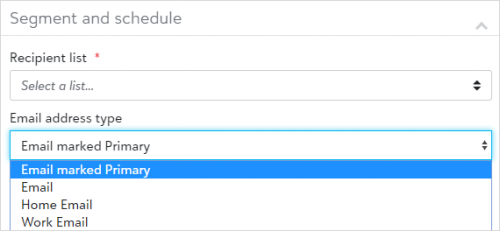
Also, to ensure messages you send from Marketing, Email are well-received, you can now choose which of your recipients’ inboxes to send them to from the new email designer. To target a specific email address, select it from the Email address type field under Finalize your email in the email designer. Previously, you could only send to primary email addresses.
Note: To send email to a constituent, their record must include an email address that matches the type you select in the Email address type field. Otherwise, Email suppresses the constituent from the message.
View metrics for all marketing email messages (for those with Email). To help track messages you send from Marketing, Email, you can now view constituents associated with metrics — such as the number of clicks or opens — from all sent messages. Previously, you could only view the constituents from the five most recent messages. To view the constituents — and their email addresses — select View all sent emails under Recent emails and select the number in the Recipients, Opens, Clicks, Hard bounces, or Unsubscribes column for the email to analyze.
Note: Don't see Email? No need to worry. If all goes well based on feedback and usage, expect its wider release in a future update.
For more information, or to catch up on previous releases, check out the What's New Help and What's Recent Help. Enjoy!

Note: If you currently have a saved list that uses the Wealth & ratings filters but don't have the proper security, you'll encounter a permission error when you open that list.
Admins! In the database view, you can secure access to the Wealth & ratings filters and Rating columns. To enable someone to use these features, grant their security group at least View rights for the Ratings permission under Constituent Privileges in Admin, Security. For more information, see Wealth and Ratings Filters.
Link a user account to a constituent record.
To enable a fundraiser, staff member, or volunteer to use Raiser's Edge NXT, you link their constituent record to their user account. On a constituent record, you can now view and manage the linked user account under Constituent summary. To link a constituent record to a user account, under Constituent summary select Edit, User account, search for the user's Raiser's Edge NXT account, and select Save.If a constituent is already linked to a user account and you mark that record as a Fundraiser, you no longer have to manually search for the user account. Instead, marking the constituent as a Fundraiser automatically selects the linked user. For more information, see User Account.
For some of you:
Design email more efficiently and select which email address to use (for those with Email). To improve how quickly you can view changes when you create email messages — and to promote a consistent experience across Raiser’s Edge NXT — the email designer in Marketing, Email includes a new look and feel. For more information, see Email Designer.
Also, to ensure messages you send from Marketing, Email are well-received, you can now choose which of your recipients’ inboxes to send them to from the new email designer. To target a specific email address, select it from the Email address type field under Finalize your email in the email designer. Previously, you could only send to primary email addresses. Note: To send email to a constituent, their record must include an email address that matches the type you select in the Email address type field. Otherwise, Email suppresses the constituent from the message.
View metrics for all marketing email messages (for those with Email). To help track messages you send from Marketing, Email, you can now view constituents associated with metrics — such as the number of clicks or opens — from all sent messages. Previously, you could only view the constituents from the five most recent messages. To view the constituents — and their email addresses — select View all sent emails under Recent emails and select the number in the Recipients, Opens, Clicks, Hard bounces, or Unsubscribes column for the email to analyze.
Note: Don't see Email? No need to worry. If all goes well based on feedback and usage, expect its wider release in a future update.
For more information, or to catch up on previous releases, check out the What's New Help and What's Recent Help. Enjoy!

4
Comments
-
I am looking forward to using each of these.0
-
Good to hear about these changes, looking forward to them!0
Categories
- All Categories
- 6 Blackbaud Community Help
- 209 bbcon®
- 1.4K Blackbaud Altru®
- 395 Blackbaud Award Management™ and Blackbaud Stewardship Management™
- 1.1K Blackbaud CRM™ and Blackbaud Internet Solutions™
- 15 donorCentrics®
- 360 Blackbaud eTapestry®
- 2.5K Blackbaud Financial Edge NXT®
- 649 Blackbaud Grantmaking™
- 567 Blackbaud Education Management Solutions for Higher Education
- 3.2K Blackbaud Education Management Solutions for K-12 Schools
- 937 Blackbaud Luminate Online® and Blackbaud TeamRaiser®
- 84 JustGiving® from Blackbaud®
- 6.5K Blackbaud Raiser's Edge NXT®
- 3.7K SKY Developer
- 247 ResearchPoint™
- 118 Blackbaud Tuition Management™
- 165 Organizational Best Practices
- 239 The Tap (Just for Fun)
- 33 Blackbaud Community Challenges
- 31 PowerUp Challenges
- 3 (Open) PowerUp Challenge: Data Health
- 3 (Closed) Raiser's Edge NXT PowerUp Challenge: Product Update Briefing
- 3 (Closed) Raiser's Edge NXT PowerUp Challenge: Standard Reports+
- 3 (Closed) Raiser's Edge NXT PowerUp Challenge: Email Marketing
- 3 (Closed) Raiser's Edge NXT PowerUp Challenge: Gift Management
- 4 (Closed) Raiser's Edge NXT PowerUp Challenge: Event Management
- 3 (Closed) Raiser's Edge NXT PowerUp Challenge: Home Page
- 4 (Closed) Raiser's Edge NXT PowerUp Challenge: Standard Reports
- 4 (Closed) Raiser's Edge NXT PowerUp Challenge: Query
- 782 Community News
- 2.9K Jobs Board
- 53 Blackbaud SKY® Reporting Announcements
- 47 Blackbaud CRM Higher Ed Product Advisory Group (HE PAG)
- 19 Blackbaud CRM Product Advisory Group (BBCRM PAG)
