For those in the United States,
Target Analytics uses advanced analytics to automatically provide suggested ask amounts for your constituents. In
Raiser's Edge NXT, these ask amounts appear as a constituent's
Online ask amount and
Next ask amount. Together, they help paint a fuller picture of a constituent's giving potential, based on their history with your organization and others. Individually, which to use depends on the intent of your ask!
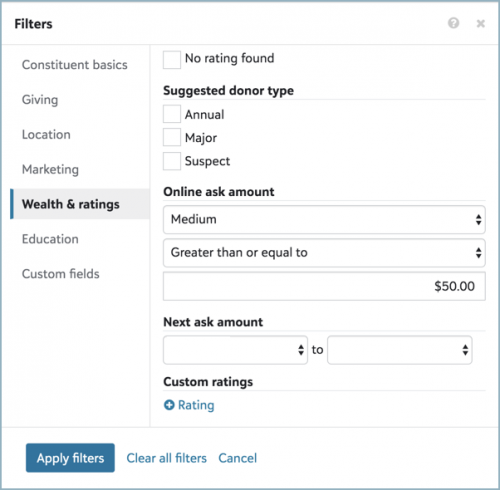 Online ask amount.
 To help identify how much to ask a donor to give
as an online donation, use
Online ask amount. To suggest this ask amount,
Target Analytics uses advanced predictive analytics to determine a range of low, medium, and high ask amounts — such as
$25-$50-$75 or
$100-$150-$250 — based on a constituent's giving to other organizations. With this analysis, you can:
- Create online donation forms based on the suggest ask amount ranges and include them in targeted appeals.
- Identify donors with a capacity for increased online donations, based on their giving to other organizations.
To view these ask amount ranges for a list of constituents, select
Choose columns,
Online ask amount, and
Apply changes. If a constituent has no suggested ask amount, 'No amount assigned' appears in the column.
Target Analytics may not provide online ask amounts for a constituent if:
- Their record is new and not yet scored
- Their primary address is outside of the United States
- Their record has insufficient or incorrect name or address information
To filter a constituent list based on these ask amounts, select
Filters,
Wealth & ratings, and, under
Online ask amount, choose the ask amount ranges to include.
For more information, check out the
Online Ask Amounts Help.
Next ask amount. With
Wealth Analytics, to help identify how much to solicit a donor
for their annual giving, use their
Next ask amount. To suggest this ask amount,
Target Analytics uses advanced analytics to determine minimum and maximum ask amounts based on their giving history with your organization, enhanced with profile data to estimate their capacity to give. With this analysis, you can help identify who to ask for larger gifts and which current annual donors to cultivate into major donors.
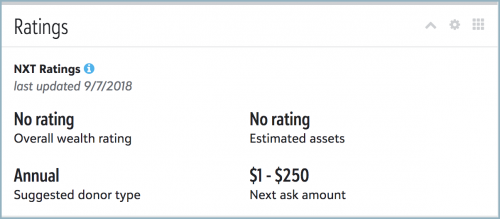
On a constituent's record, you can view their suggested next ask amounts under
Ratings. To view these ask amounts for a list of constituents, select
Choose columns,
Next ask amount, and
Apply changes.
To filter a constituent list based on these ask amounts, select
Filters,
Wealth & ratings, and, under
Next ask amount, choose the range of minimum and maximum ask amounts to include.
For more information, see the
Blackbaud NXT Ratings Help.